
AI Douyin is an AI-powered search app: you ask with text, voice or an image, it synthesizes information from across the web into an answer with video and article results side by side, and you can search from the video page without switching screens.
What AI Douyin is
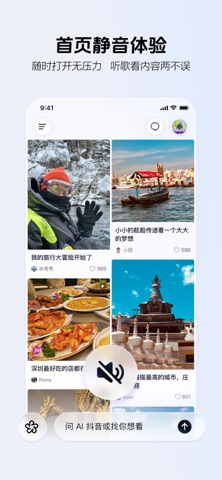
AI Douyin is an AI search app centred on deep reasoning. Rather than adding one more search box, it places search inside the act of watching videos: ask a question and AI synthesizes an answer from information across the web while presenting video and article results in two parallel columns. While watching, the search box at the bottom of the video page opens results inline, so you never leave the screen.
Input covers text, voice and images, which suits the "I saw something, I want to know what it is" moment.
Main capabilities
- Deep reasoning and search: synthesizes information from across the web into a fuller written answer with video and article results alongside.
- Two-column results: video and article results sit side by side so you can choose the format you want.
- Search while watching: search from the video page and see results embedded in the current screen.
- Smart recommendations: suggests videos based on browsing history and interests.
- AI creation support: idea suggestions, analysis of your own posts, and conversational answers to creation questions.
- AI conversation: chat with Doubao AI by text or voice on the Messages page, including voice calls.
- AI content generation: image generation, writing and AI video generation.
How to use it
- Open AI Douyin and ask from the home search box or the chat entry.
- Choose text input, voice input, or upload an image.
- Read the generated answer, then pick a video or article from the two columns for more depth.
- While watching a video, use the search box at the bottom to search inline.
- For creation work, open the relevant entry for idea suggestions, post analysis or AI generation.
- To follow up, continue in the Messages page with Doubao AI by text or voice.
Where it fits
- Look it up while watching: unfamiliar terms, places or products can be searched without interrupting playback.
- Questions needing several angles: a written summary plus video explanation is easier to judge than one format alone.
- Content creation: find topics, review how your posts perform, and ask creation questions directly.
- Learning and everyday decisions: get an overview first, then check details at the original source.
- Asset generation: try image, copy or video material through the generation features.
Limitations
The material does not state pricing, availability by region, or accuracy rates, so confirm these yourself. AI answers can be incomplete or outdated; for medical, legal or financial topics always return to authoritative sources. Copyright and platform rules for generated content follow official terms, so check licensing before public use. Recommendations adapt to your behaviour, so prefer search when you want less noise.
FAQ
How is it different from ordinary search? Answers are synthesized by AI from web information with two columns of video and article results, and search works directly inside the video page.
Which inputs are supported? Text, voice and images.
Can the AI answer be trusted as is? Not directly; for high-risk topics verify with authoritative sources first.
Frequently asked questions
How is it different from ordinary search?
Search sits inside short-video browsing: AI synthesizes an answer from web information and adds two columns of video and article results, and on a video page the search box at the bottom opens results inline instead of making you switch apps.
Can I ask by voice or image?
Yes. The material states support for text, voice and image input.
Should I trust the AI answer directly?
Not without checking. The material gives no accuracy claims, so factual, medical, legal or financial points should be verified against authoritative sources.