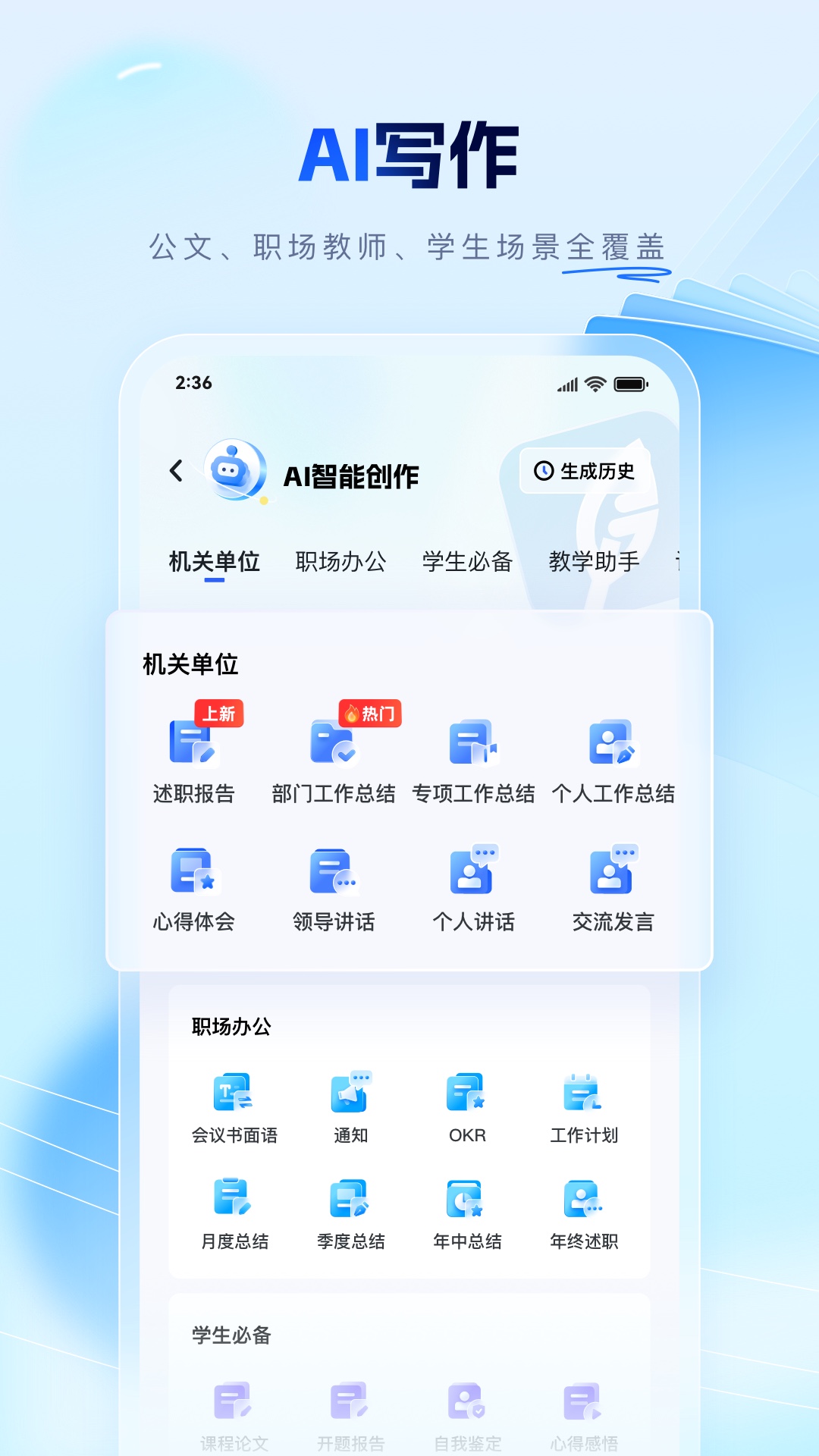
Bimo Writing is a Chinese AI writing app that generates official documents, theses, lesson plans and workplace texts using a customised model built on the full DeepSeek-R1. Its core is six scenario modules plus helper tools: official document drafting covers performance reviews, work summaries, reflection essays and leadership speeches; academic reports cover theses and lab reports; the teacher assistant produces lesson plans and class-meeting proposals; the library, workplace office and one-click slide generation round it out.
Bimo Writing: a Chinese AI writing app tuned for official documents, lesson plans and theses
Bimo Writing is a Chinese-language AI writing app built on the full DeepSeek-R1 model. Its audience is narrowly defined: civil servants, students, teachers and office professionals. Rather than offering one general chat box, it splits writing into scenario modules - official document drafting, academic and internship reports, a teacher assistant, an inspiration library, workplace office work and AI slide generation - and each module supplies templates and outlines by document type. For people who stall on format and convention rather than on ideas, removing that first step is the whole point.
The hard part of Chinese professional writing is rarely the argument; it is the convention. How a performance review report should be structured, which headings a work summary needs, how detailed a lesson plan must be, how thesis chapters are ordered - these rules live inside experience and sample documents. Newcomers either cannot find them or cannot reproduce them convincingly. Bimo Writing turns those conventions into modules: pick the document type, receive an outline, expand it into a draft, then run proofreading and polishing.
Technically the product follows a customised-model approach, wrapping scenario logic around a general reasoning model such as DeepSeek-R1. Beyond generation it bundles supporting tools: proofreading and polishing, outline generation, PDF conversion and image handling, plus a library of sample texts, writing material, slide templates and courseware. From finding references and fixing a framework through writing the body text and adjusting formats, the intent is to finish the job inside one app.
What Bimo Writing does
Official document drafting
Covers the document types that dominate public-sector writing: performance review reports, work summaries, reflection essays and leadership speeches. The tool supplies structure per document type, generates an outline, and offers proofreading and polishing on the finished draft. Since the difficulty in this genre is tone and convention, a template-driven approach fits well.
Academic and internship reports
Aimed at university students, covering graduation theses, lab reports and internship reports, and described as supporting the whole path from topic selection to final draft. In practice, hand over the topic framing and chapter structure; data, experimental conclusions and citations still need your own verification.
Teacher assistant
Generates lesson plans, teaching work plans and class-meeting proposals, with the goal of shrinking the paperwork side of lesson preparation. For teachers who also serve as homeroom supervisors, class-meeting plans and teaching schedules are real extra load, so the need is genuine.
Inspiration library
Holds sample texts, writing material, slide templates and courseware in one place, addressing the problem of not knowing what a good document looks like. The library is meant as a reference point, not as copy-paste material.
Workplace office
Produces meeting language, work plans and slide outlines for everyday office documents, and bundles PDF conversion and image handling so format chores sit in the same place.
AI slides
Enter a topic and generate slide content in one step, then adjust details and switch templates. Useful for getting a presentable first draft quickly; visual design is still better finished in a dedicated design tool.
Outline generation and proofreading
Two helpers that run through the whole workflow: fix the structure with an outline first so the draft does not drift, then polish wording, punctuation and inconsistent phrasing once the text exists.
Customised model foundation
Built on the full DeepSeek-R1 with scenario-level customisation on top. Compared with opening a general chat window, the scenario packaging preloads conventions at the prompt level, so you spend fewer turns explaining requirements.
How to use it
- Install the Bimo Writing app from an app store or its official channel and sign in.
- Choose the entry point by role: official document drafting for performance reviews and work summaries, academic reports for theses and lab reports, the teacher assistant for lesson preparation.
- Generate an outline first and check whether the chapter order and key points are complete. Fill the gaps yourself - this step determines the quality of everything that follows.
- Expand section by section, inserting the real data, cases and circumstances you actually hold, so the result does not read as generic boilerplate.
- Run proofreading and polishing over wording and format, then use AI slides when the content also needs to be presented.
- Before submitting, check document conventions, titles and signature blocks against your organisation's or school's requirements. AI-generated text remains your responsibility.
Who it fits
- Civil servants and public institution staff who regularly file performance reviews, work summaries and reflection essays.
- University and graduate students writing theses, lab reports and internship reports.
- Teachers and homeroom supervisors preparing lesson plans, teaching plans and class-meeting proposals.
- Office professionals producing meeting notes, work plans and reporting decks.
- Self-learners who need to see good samples before they can write on their own.
Limits and caveats
- The source material does not disclose pricing, free quotas or subscription tiers, so cost must be confirmed inside the app.
- No verifiable official website was found; release notes and privacy terms should be read from the app store listing and in-app notices.
- Official documents, lesson plans and theses are highly regulated formats. AI output is a first draft only - format, policy wording and data sources must be verified by the user.
- Thesis scenarios carry academic integrity risk. Generated text cannot substitute for your own research, and citation and plagiarism checks remain your responsibility.
- The style tends toward boilerplate, and repeated generation for the same document type may produce similar phrasing, so personal detail needs manual editing.
- Terminology and conclusions in specialist fields such as medicine, law or engineering have not been independently verified and should not be used unedited.
Frequently asked questions
Is Bimo Writing free?
The source material does not disclose pricing, free quotas or subscription tiers, so whether it is free and how billing works cannot be confirmed. Check the subscription page inside the app or the payment notes on the app store listing before committing.
How is it different from using DeepSeek directly?
Bimo Writing is built on the full DeepSeek-R1 but wraps scenario logic around it: structures and outlines are preset for official documents, lesson plans, theses and office texts, and proofreading, a material library and AI slides come bundled. A general model requires you to specify the conventions yourself; this removes part of that briefing work.
Can I submit the generated text as it is?
Not advisable. Official documents have format and policy requirements, lesson plans must match actual classrooms, and theses raise academic integrity questions. Treat the output as a draft, add your own substance, verify data, adjust the format and take responsibility for the result.
What document types are supported?
Public material lists official document drafting (performance reviews, work summaries, reflection essays, leadership speeches), academic reports (theses, lab reports, internship reports), the teacher assistant (lesson plans, teaching work plans, class-meeting proposals), workplace office texts (meeting language, work plans, slide outlines) and AI slides.
Frequently asked questions
Is Bimo Writing free?
The source material does not disclose pricing, free quotas or subscription tiers, so whether it is free and how billing works cannot be confirmed. Check the subscription page inside the app or the payment notes on the app store listing before committing.
How is it different from using DeepSeek directly?
Bimo Writing is built on the full DeepSeek-R1 but wraps scenario logic around it: structures and outlines are preset for official documents, lesson plans, theses and office texts, and proofreading, a material library and AI slides come bundled. A general model requires you to specify the conventions yourself; this removes part of that briefing work.
Can I submit the generated text as it is?
Not advisable. Official documents have format and policy requirements, lesson plans must match actual classrooms, and theses raise academic integrity questions. Treat the output as a draft, add your own substance, verify data, adjust the format and take responsibility for the result.
What document types are supported?
Public material lists official document drafting (performance reviews, work summaries, reflection essays, leadership speeches), academic reports (theses, lab reports, internship reports), the teacher assistant (lesson plans, teaching work plans, class-meeting proposals), workplace office texts (meeting language, work plans, slide outlines) and AI slides.