
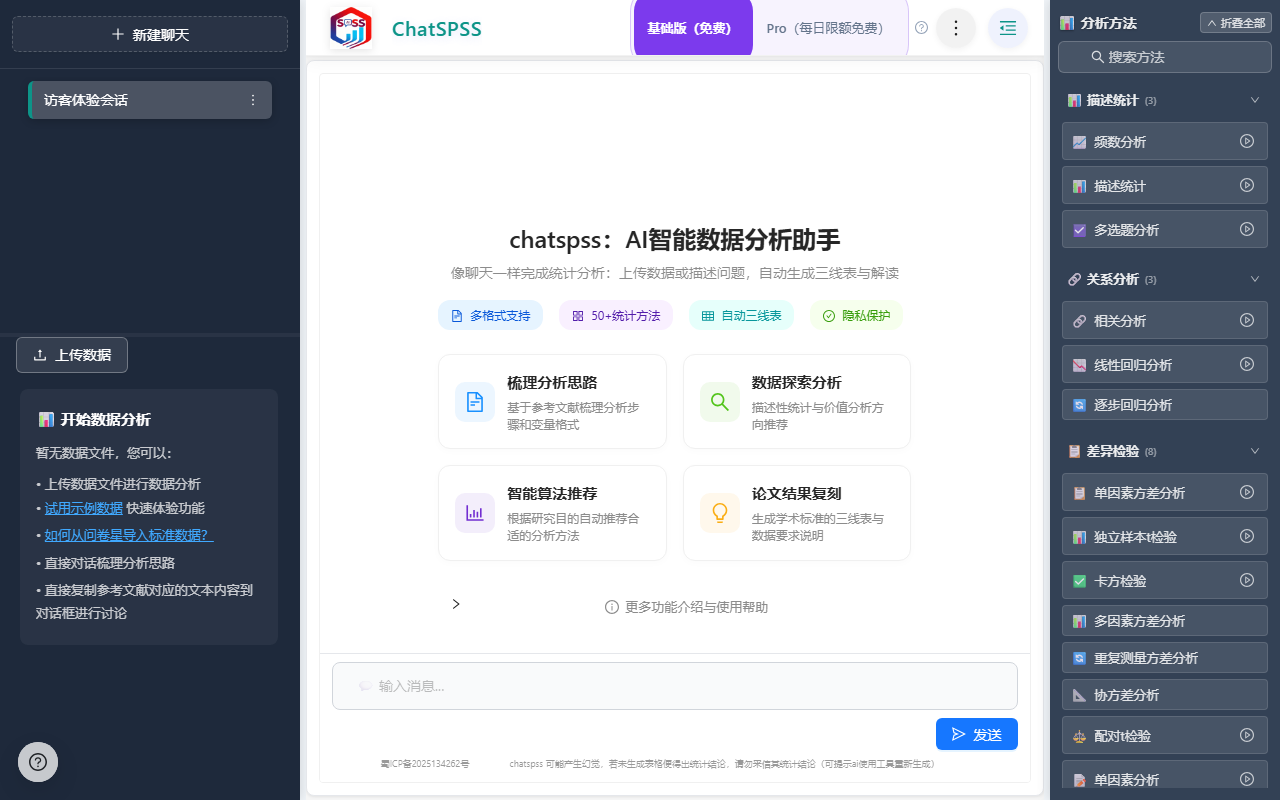
ChatSPSS is an AI online intelligent data analysis assistant used in a browser. Its core is to let users upload CSV, Excel, SPSS (.sav), or Stata (.dta) data, describe their needs in natural language, and automatically complete over 50 common statistical methods including descriptive statistics, t-tests, ANOVA, regression analysis, Logistic regression, reliability and validity analysis, mediation and moderation analysis, cluster analysis, and ROC analysis. It outputs academic tables, statistical charts, and Chinese interpretations suitable for papers.
One-Sentence Answer
ChatSPSS turns "asking questions" into "doing statistics": open the official website https://chatspss.cn/, upload common data files, and then use Chinese to explain what you want to analyze. The system will assist in selecting methods, executing statistics, generating charts and academic tables, and providing Chinese result interpretations for academic writing.
Product Positioning
ChatSPSS is positioned not to rebuild a complex statistical software, but to bring traditional SPSS-like analysis into the browser and use AI dialogue to lower the operational barrier. It is more suitable for users who need to quickly complete data analysis but may not be familiar with statistical software menus and parameter settings, such as graduation papers, coursework, questionnaire surveys, satisfaction research, and market data analysis.
Compared with locally installed tools, it emphasizes no installation and cross-platform browser accessibility; compared with simple chatbots, it focuses more on the entire chain of data files, statistical methods, academic format output, and result interpretation.
Core Features
1. AI Conversational Data Analysis
Users can directly state their needs in natural language, such as "Help me do reliability analysis," "Is this questionnaire suitable for regression analysis?" or "Generate an academic table for me." The system will assist in determining the statistical method based on the data structure and execute the corresponding analysis.
2. Online SPSS Analysis
No need to install traditional SPSS software; common statistical analysis can be completed in the browser, compatible with Windows, Mac, and other environments.
3. Multi-format Data Upload
Supports mainstream formats such as CSV, Excel, SPSS .sav, and Stata .dta. After uploading, it automatically parses the variable structure, reducing manual sorting costs.
4. Coverage of Over 50 Statistical Methods
The scope listed in public materials includes: descriptive statistics, frequency analysis, t-test, paired t-test, analysis of variance (ANOVA), chi-square test, non-parametric test, correlation analysis, regression analysis, binary/multinomial/ordinal Logistic regression, reliability analysis (Cronbach's α), validity analysis (EFA), confirmatory factor analysis (CFA), mediation analysis (Bootstrap), moderation analysis, cluster analysis, ROC curve/AUC, etc. Diagnostics and visualization also involve normality tests, collinearity (VIF), box plots, scatter plots, heat maps, etc.
5. Academic Result Output
The platform can automatically generate academic three-line tables, statistical charts, and easy-to-understand Chinese result interpretations, which can be easily copied to Word for graduation papers, coursework, journal submission preparation, or research report compilation.
Usage Steps
- Register and Login: Visit the ChatSPSS official website https://chatspss.cn/, complete account registration, and log in.
- Upload Data: Upload CSV, Excel, SPSS (.sav), or Stata (.dta) files to the platform.
- Input Needs in Dialogue: State your goals in the chat box, such as doing reliability analysis, judging regression suitability, or generating an academic table.
- Automatic Execution: The system selects and executes statistical methods based on variable structure and user needs.
- View Output: Read statistical results, visual charts, academic tables, and Chinese interpretations.
- Follow-up and Adjustment: Continue asking for details, change models, or adjust analysis methods.
- Export and Apply: Copy results and charts to Word or papers for writing and reporting.
Applicable Scenarios
- Undergraduates and Postgraduates: Completing the data analysis section of graduation papers, coursework, or degree theses.
- Academic Writers: Needing statistical tests, regression analysis, reliability and validity tests, and standard academic tables.
- Questionnaire Survey Users: Processing questionnaire data for satisfaction surveys, user research, and social surveys.
- Market Researchers: Analyzing consumer behavior and brand preferences, doing regression, cluster, or ROC analysis to assist decision-making.
- Medical, Educational, and Management Social Science Researchers: Executing common methods like t-tests, ANOVA, and Logistic regression.
- Statistical Analysis Beginners: Unfamiliar with SPSS interface and statistical principles, hoping to complete professional analysis using natural language.
Advantages
- Zero-barrier Online Use: No installation required; analysis can start directly in the browser.
- AI Conversational Interaction: Describing needs in Chinese triggers method identification and execution.
- Multi-format Compatibility: Covers CSV, Excel, SPSS (.sav), Stata (.dta).
- Broad Method Coverage: Public materials claim coverage of over 50 common statistical methods, fitting academic statistical scenarios.
- Writing-friendly Output: Academic tables, charts, and Chinese interpretations can directly enter the paper compilation process.
- Reduced Understanding Cost: Converts complex statistical outputs into Chinese explanations that are easier to judge for significance and meaning.
Limitations and Verification Notice
The public fact sheet does not provide information on pricing, free quotas, membership rights, concurrency limits, data retention periods, privacy terms, APIs, offline capabilities, enterprise deployment, or team collaboration. Therefore, its commercial plans and compliance boundaries cannot be judged based on this. For volatile information such as pricing, availability, account rights, data security, and export restrictions, please refer to the latest pages, registration agreements, and privacy policies on the ChatSPSS official website https://chatspss.cn/.
Furthermore, AI-assisted selection of statistical methods does not replace research design judgment; sampling methods, variable measurement levels, assumption premises, outlier handling, and model interpretation still require researchers to review them against disciplinary standards.
Alternatives
- Traditional SPSS Software: Suitable for users who already have local software conditions and need a complete menu-driven statistical process; ChatSPSS differs in being installation-free and conversational.
- ChatSRS: Public comments mentioned "There is another similar ChatSRS; it also uses AI for data analysis," which can be used as a clue for similar tools to search and verify yourself, but its capabilities, pricing, and official website information are not provided in the fact sheet.
- Excel or Google Sheets Formula Tools: The fact sheet shows an adjacent topic of "converting text to Excel or Google Sheets formulas," which leans more towards formula generation and is not a complete academic statistical output chain.
Official Website and Primary Sources
- Product Official Website: https://chatspss.cn/
- Primary Source Title: chatspss: AI Intelligent Data Analysis Assistant (SPSS Online Analysis), Publisher: chatspss.cn
- Public Footer Information: © Chengdu Ziran Zhi Technology Co., Ltd. · Sichuan ICP No. 2025134262
Frequently asked questions
Does ChatSPSS require installing SPSS?
No. Public materials state that it is an AI online intelligent data analysis assistant where users upload CSV, Excel, SPSS (.sav), or Stata (.dta) files in a browser and describe their analysis needs through natural language dialogue.
What data formats does ChatSPSS support?
The formats listed in the fact sheet include CSV, Excel, SPSS .sav, and Stata .dta, and the platform claims to automatically parse the variable structure.
What statistical analyses can ChatSPSS perform?
Public materials claim it covers over 50 common statistical methods, including descriptive statistics, frequency analysis, t-tests, ANOVA, chi-square tests, correlation analysis, regression analysis, Logistic regression, reliability analysis, validity analysis, factor analysis, mediation analysis, moderation analysis, cluster analysis, and ROC analysis.
Can ChatSPSS results be directly put into a paper?
Materials state it can generate academic three-line tables, statistical charts, and Chinese result interpretations that can be copied to Word for graduation papers, coursework, or research reports; it is still recommended to verify the format against the target journal and school templates before submission.
How much does ChatSPSS cost?
The current fact sheet does not provide pricing, free quotas, or membership plans, so it cannot be verified. For changes regarding fees, availability, and rights, please check the latest information on the ChatSPSS official website https://chatspss.cn/
Are there tools similar to ChatSPSS?
User comments in the fact sheet mention that ChatSRS can also be used for AI data analysis, but its official website, features, or pricing are not provided; traditional SPSS software is a more common locally installed alternative.



