DeepSeek Harness is DeepSeek's open-source AI Agent for desktop (macOS/Windows) that organizes documents, analyzes data, writes and tests code, and verifies facts, extending itself via npm plugins and chat-built custom plugins.
DeepSeek Harness: DeepSeek's Open-Source "Everything Is a Plugin" AI Agent
What Is DeepSeek Harness
DeepSeek Harness is an open-source AI Agent from DeepSeek, built on the Cordis "everything is a plugin" architecture, and ships a ready-to-use macOS/Windows desktop app. It helps you organize documents, analyze spreadsheets, write code, verify information, and run time-consuming tasks, while letting you extend its capabilities through plugins and even create custom plugins by chatting. DeepSeek Harness is open source and free, and supports a third-party plugin ecosystem.
Key Features
- Everyday productivity: Organize materials, analyze spreadsheets/PDFs, generate charts, and build presentations.
- Software development: Understand projects, modify code, and run tests, showing each round of code changes (diff) right in the conversation.
- Fact-checking: Search sources, cross-verify claims, and return reliable, sourced conclusions.
- Long-running tasks: Run scripts and batch file processing in the background, with progress you can check anytime.
- Automation: A built-in scheduled-task plugin runs repetitive work on a plan automatically.
- Plugin extension: Install a plugin by typing an npm package name, or build a custom plugin conversationally in creation mode.
- UI customization: Flexibly choose how Agent steps are shown and how much detail the interface surfaces, matching your workflow.
How to Use DeepSeek Harness
- Download and install: Visit the official site https://www.deepseek.com/harness/ and download the macOS or Windows installer, then complete installation.
- Sign in: Launch the desktop app and log in with your DeepSeek account.
- Describe a task: Tell the chat what you need—organize documents, analyze a spreadsheet, modify code—and attach the relevant files.
- Review and refine: Preview generated files in the sidebar, inspect code diffs, and keep giving feedback through chat.
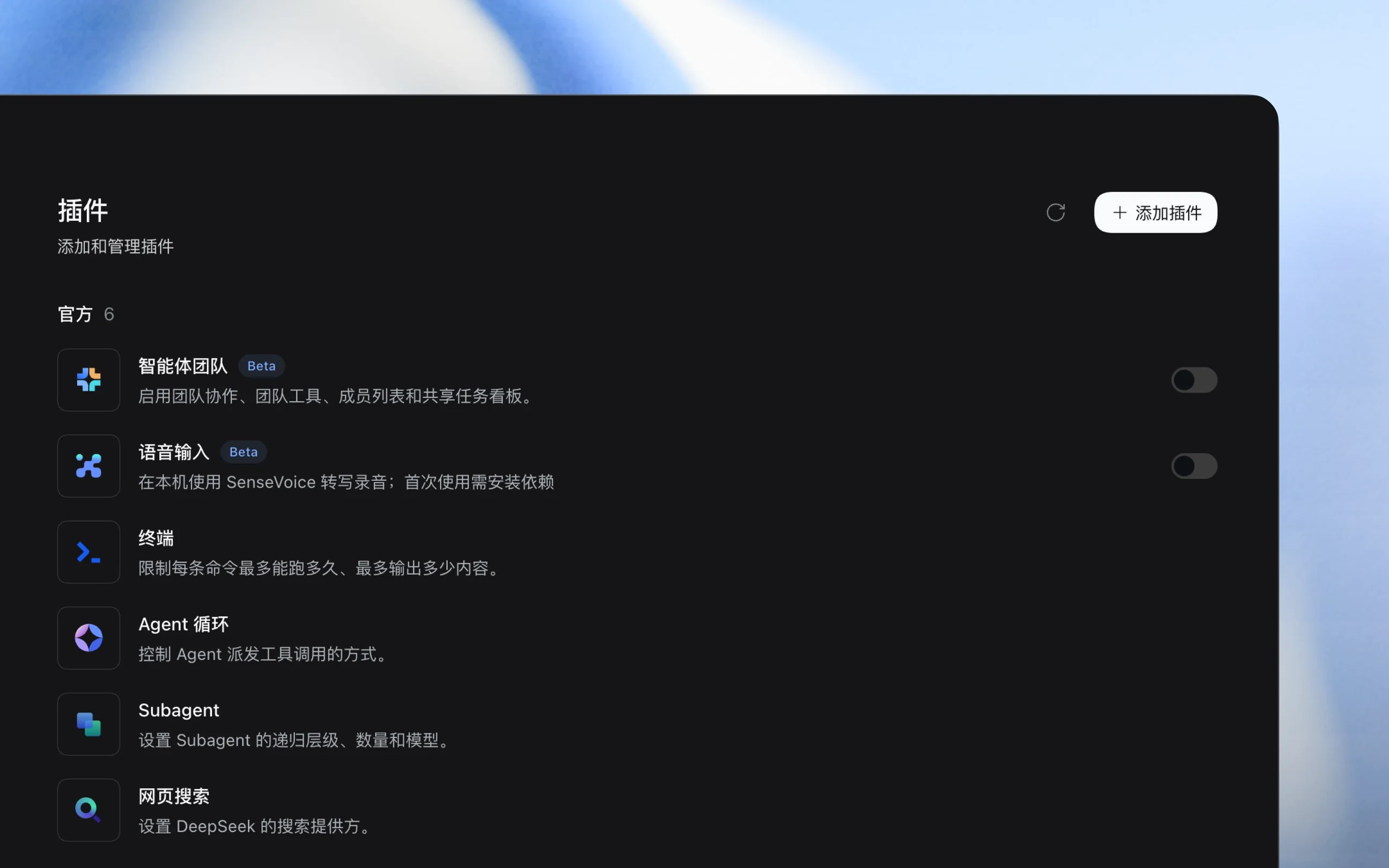
- Install plugins: On the plugin management page, enter an npm package name to install what you need, enabling, pausing, or uninstalling as required.
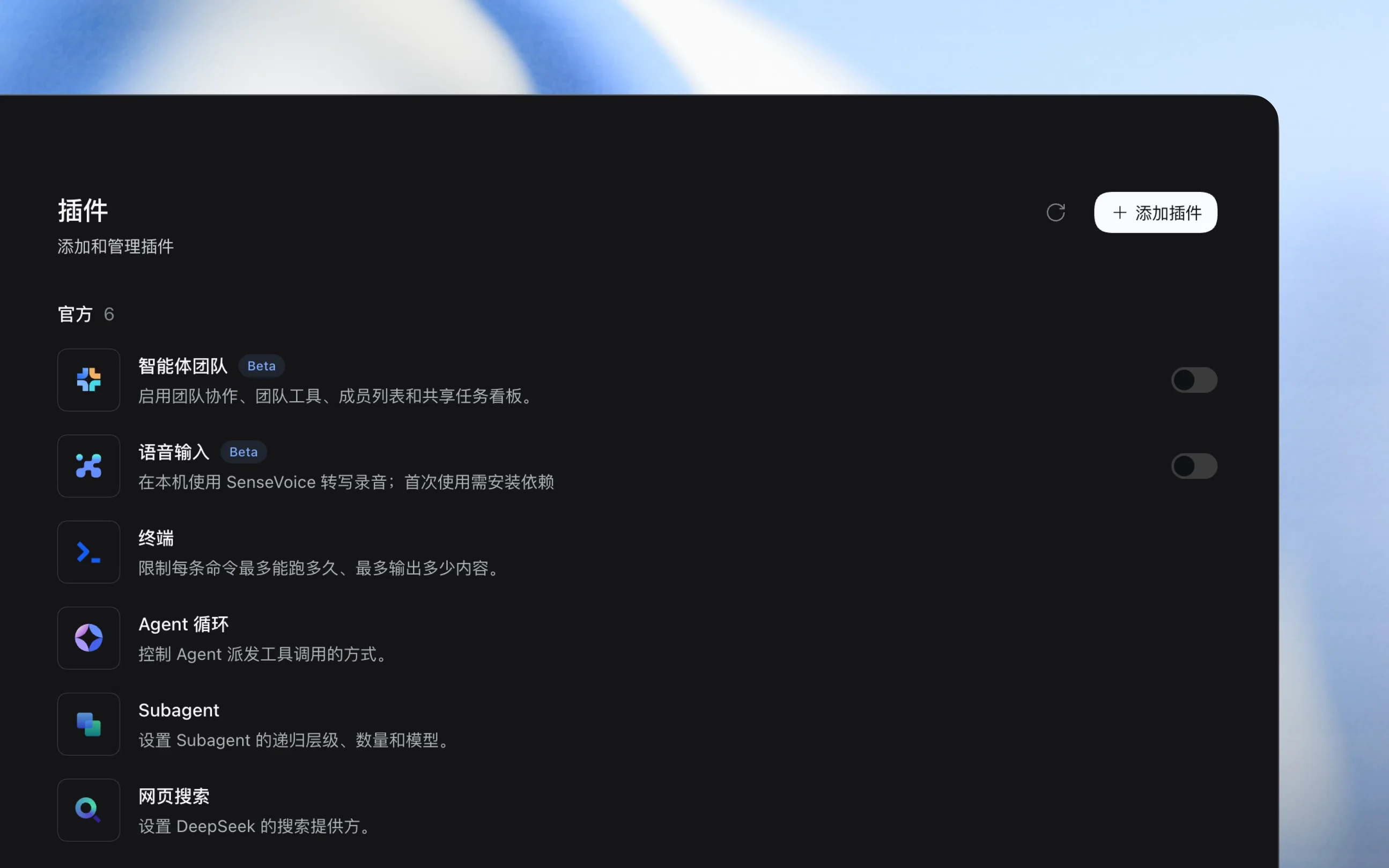
- Create custom plugins: In creation mode, describe what you want in conversation and let Harness write and save the plugin for you.
- Set up automation: Enable the automation plugin, schedule repetitive work as timed tasks, and manage execution logs.
Core Advantages
- Ready to use: macOS/Windows desktop installers ship with everyday office and dev features preloaded—no complex setup.
- Fully open source: Released under the MIT license, with transparent code you can freely customize and build on.
- Everything is a plugin: From tools to the UI itself, everything is pluggable, so you can freely compose capabilities with extreme extensibility.
- Conversational plugin creation: In creation mode, use plain language and Harness writes the plugin itself—live and persistently saved.
- Office + dev in one: Handle documents, spreadsheets, and slides, while also understanding projects, editing code, and running tests.
- Transparent process: Inspect Agent steps, execution traces, and code diffs to make troubleshooting easy.
- Automation: A scheduled-task plugin runs repetitive work in the background on a plan.
- Deep model collaboration: Co-evolves with DeepSeek models, continuously optimized for new releases.
Project Links
- Official site: https://www.deepseek.com/harness/
- GitHub repository: https://github.com/deepseek-ai/deepseek-harness
Comparison with Codex and Claude Code
| Dimension | DeepSeek Harness | Codex (OpenAI) | Claude Code (Anthropic) |
|---|---|---|---|
| License | MIT, fully open source | Open source (Apache 2.0 CLI) | Open source (some components; core with subscription) |
| Underlying model | DeepSeek series, co-evolving with the model | GPT series | Claude series, native long context |
| Product form | Desktop (macOS/Windows) + Web UI | CLI/TUI + desktop app + Cloud | CLI + desktop app + Web + IDE plugins |
| Core architecture | Cordis "everything is a plugin"; UI and tools are pluggable | Plugins + Skills + Hooks + MCP | Plugin system + sub-agents + MCP |
| Standout features | Conversational plugin creation, scheduled automation, office + dev | Voice chat, managed worktrees, security review | Multi-agent orchestration, Computer Use, automatic permissions |
| Ecosystem | npm packages as plugins; official marketplace planned | Remote plugin marketplace + workspace sharing | Plugin marketplace + integrations |
| Pricing | Pay-as-you-go DeepSeek API, high value; self-hostable open source | Subscription or API credits | Subscription (Pro/Max/Team/Enterprise) |
Use Cases
- Smart office: Organize materials, analyze spreadsheets and PDFs, generate charts, and build presentations—one-stop daily document work.
- Software development: Understand project structure, fix bugs, build features, and run tests, viewing code diffs directly in chat.
- Research: Search and cross-verify information, outputting reliable, sourced conclusions for reports and decisions.
- Automated ops: Use the scheduled-task plugin to run repetitive jobs like data sync and report generation on a plan.
- Custom tooling: Describe needs in creation mode and let Harness write custom plugins, building your own tools and workflows.
FAQ
Is DeepSeek Harness free? DeepSeek Harness itself is fully open source and free under the MIT license and can be self-hosted; actual model calls are billed by DeepSeek API usage, at a relatively high value.
Can I use it without coding? Yes. It ships everyday office capabilities—organizing documents, analyzing spreadsheets, building presentations—and plugins can be written conversationally in creation mode by Harness itself, no manual coding required.
Where do plugins come from? You can install community plugins by entering an npm package name, or generate and save custom plugins in natural language via creation mode; an official plugin marketplace is also planned.
Frequently asked questions
Is DeepSeek Harness free?
DeepSeek Harness itself is fully open source and free under the MIT license and can be self-hosted; actual model calls are billed by DeepSeek API usage, at a relatively high value.
Can I use it without coding?
Yes. It ships everyday office capabilities and plugins can be written conversationally in creation mode by Harness itself, with no manual coding required.
Where do plugins come from?
You can install community plugins by entering an npm package name, or generate and save custom plugins in natural language via creation mode; an official plugin marketplace is also planned.