

DuMate is Baidu's super AI assistant: you give an instruction in plain language and it understands the intent, works across apps and files, and returns finished output such as documents, images, videos or recurring reports.
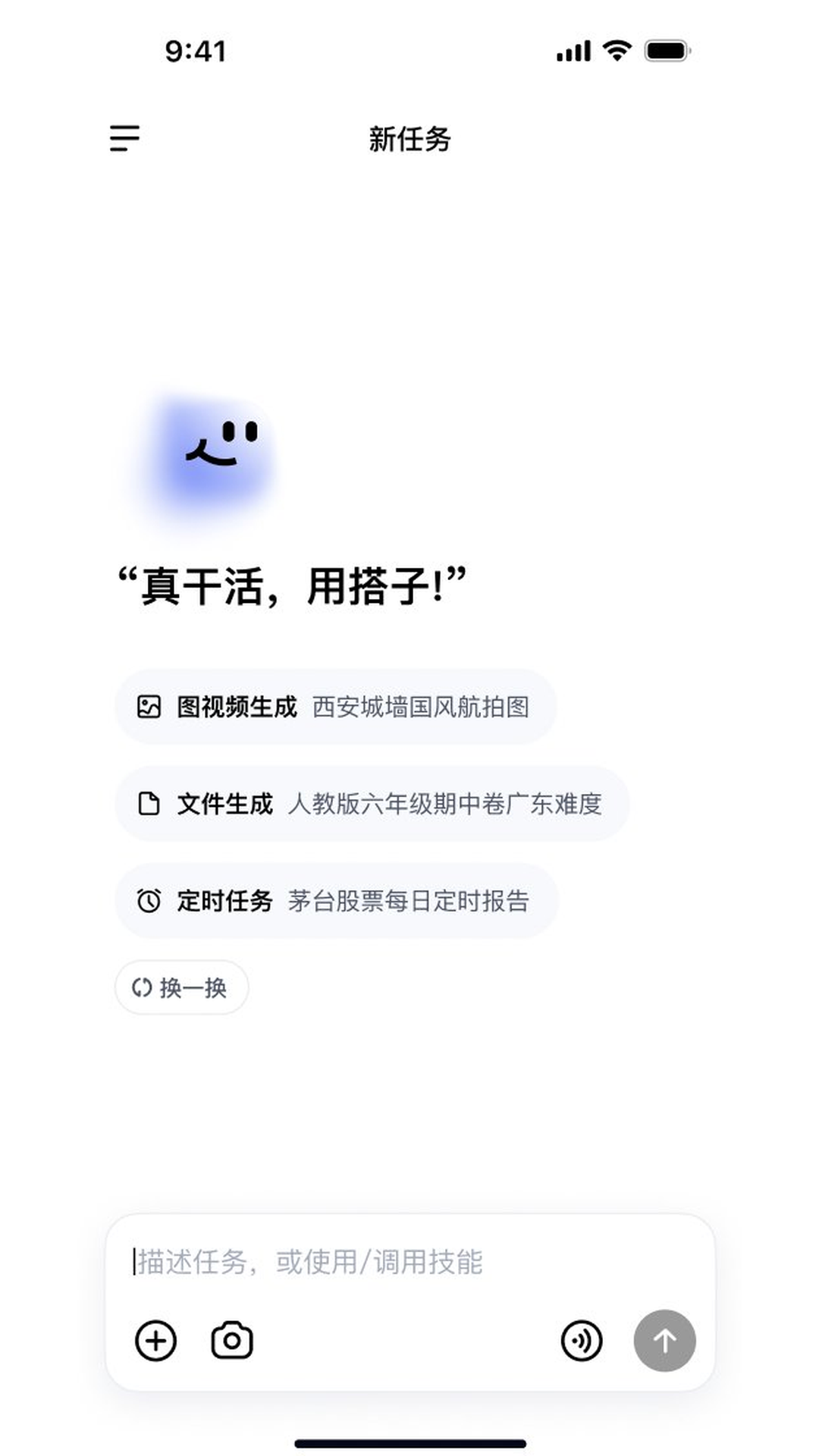
DuMate: Baidu's Super AI Assistant
Product Overview
DuMate is a super AI assistant from Baidu that takes natural language as its entry point. Instead of stopping at conversation, it autonomously completes complex work that spans multiple applications and multiple files, closing the loop from understanding to execution. Because it remembers, DuMate gradually learns a user's working habits and task preferences through continued collaboration, which makes later interactions noticeably more precise.
The difference from an ordinary chatbot lies in what gets delivered. You are no longer asking "tell me how to do this" — you are saying "get this done." The assistant interprets the intent, breaks the job into steps, and produces a usable artifact: a document, an image, a video, or a recurring report.
Core Capabilities
Natural-language task execution: Describe the job in conversation and the AI understands and carries out cross-application, cross-file operations rather than merely offering written advice.
Image and video generation: Generate images and video from instructions, supporting creative production and asset preparation.
File generation: Automatically produce documents, exam papers and similar files. The published material cites an example such as "a sixth-grade midterm paper at Guangdong difficulty level" — a request with precise constraints attached.
Scheduled tasks: Set recurring jobs, such as a daily report on a given stock, for automated information tracking and delivery.
Memory learning: Learn user habits and preferences over continued collaboration, so the longer it is used the better it fits a personal working rhythm.
Skill invocation: Call specific skills with a
/command to extend what the assistant can do.
How to Use It
Describe the task: State in natural language what needs to be done, and give as many constraints as possible — subject, format, difficulty, time range.
Confirm the execution path: Review how the assistant understood and decomposed the task, then add or correct requirements where needed.
Receive the output: Let the assistant finish the cross-app and cross-file work and collect the document, image, video or data result.
Set recurring jobs: For information that needs long-term tracking, configure a scheduled task so reports arrive on a fixed cycle.
Invoke skills: When a specific capability is needed, call the matching skill with
/.Keep collaborating: Repeated use lets the memory mechanism adapt to personal habits and preferences.
Where It Fits
Everyday office automation: Drafting documents, organising material, handling spreadsheets and data — the repetitive category of work.
Education and question banks: Generating exam papers or practice material by grade, textbook edition and difficulty.
Creative asset production: Producing images and video from instructions for content work and pitch decks.
Scheduled information tracking: Setting periodic reports for stock prices, public sentiment or industry movement, cutting down manual monitoring and searching.
Personal productivity assistant: Taking on long-running, continuous personal tasks by relying on memory.
Limits and Cautions
Official information is limited: Published material does not provide an official website, pricing, supported platforms (mobile or desktop) or account system. Confirm actual availability through Baidu's official channels.
Check the results: Cross-app and cross-file automated actions, along with generated documents, exam papers and data, should be reviewed by the user before use — especially anything meant for publication or formal decisions.
Scheduled tasks depend on outside sources: The accuracy of periodic reports is affected by data sources and update frequency, so they should not be the sole basis for investment or business decisions.
Memory and privacy: Memory learning accumulates habits and preferences. Be cautious about submitting sensitive work content and pay attention to the privacy settings the platform offers.
Capability boundaries: The material does not list a complete skill catalogue or the range of third-party apps that can be called. Verify at small scale before relying on capabilities beyond those described.
Frequently asked questions
What is DuMate, and how is it different from a regular chatbot?
DuMate is a super AI assistant from Baidu that uses natural language as its interface and autonomously completes complex cross-app and cross-file tasks, closing the loop from understanding to execution. Unlike a regular chatbot, it does not stop at written advice — it delivers finished documents, images, videos or periodic reports.
What kinds of tasks can DuMate handle?
Published material lists natural-language task execution, image and video generation, document and exam-paper generation, recurring scheduled tasks, memory learning from collaboration history, and calling specific skills with a slash command.
How do scheduled tasks work, and what are they good for?
You configure a recurring job and the assistant produces a report at the set frequency, for example a daily market or information digest. It suits information that needs steady long-term tracking, but because accuracy depends on data sources and update frequency it should not be the only input to a decision.
What should I watch out for when using DuMate?
Public material does not give an official website, pricing, supported platforms or account details, so confirm availability through Baidu's official channels. Review cross-app actions and generated files before use, and keep privacy in mind when sensitive work content is submitted to memory learning.



