

FaceFancy suits users who want to generate AI avatars in different styles, make creative face swap short videos, turn photos into anime style, restore old and blurry photos, or make final cropping, brightness, and contrast adjustments on generated results.
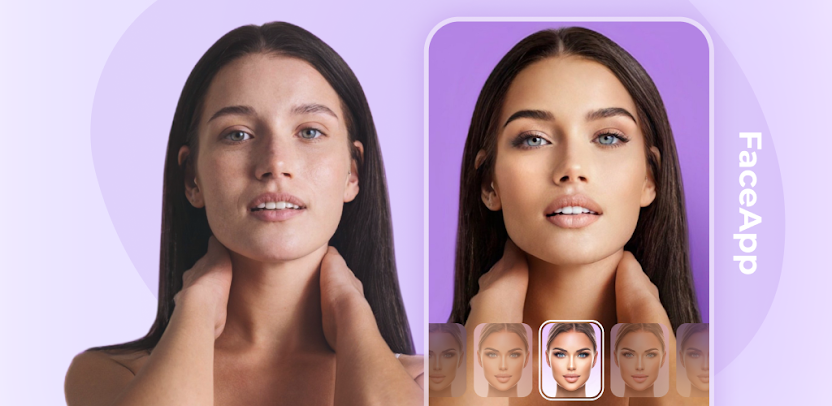
FaceFancy: An All-in-One App for Face Swap, Photo Editing, and Creative Generation
FaceFancy is a smart app that brings AI face swap, photo editing, and creative generation together in one place. Its core capabilities are face swap for both photos and videos, plus AI avatar generation in different styles from a selfie — business, wedding, traditional costume, and other style options all sit on this same line. Alongside that, it also folds in age transformation, gender swap, anime avatars, old photo restoration, and basic editing tools, forming a portrait-centered image processing toolkit. Simple operation and a friendly interface are its basic experience, and a paid subscription unlocks all features.
Main Features
Photo Face Swap You can swap faces between your own or someone else's photo and a target photo to create a new visual effect. It is the most basic and most direct feature of this kind of app.
Video Face Swap You can replace your own face into a video clip you like to make a personalized video. Used on creative content or fun short videos, this is what sets it apart from pure image tools.
Multiple Style Avatars It provides multiple style options for AI avatar generation, including professional business photos, wedding photos, traditional costumes, classic luxury styles such as old money aesthetics, 1990s yearbook styles, and more. Because they are generated from a selfie, the style changes stay at the level of overall appearance.
AI Anime Avatars It supports converting ordinary photos into anime-style avatars, which belongs to the stylization processing route.
Age Transformation You can see what you would look like older or younger. Its use is more about previewing and trying out results.
Gender Swap It produces a gender swap effect, letting you see your facial features as the opposite sex.
Old Photo Restoration It performs high-quality restoration and enhancement on old and blurry photos. This one is unrelated to creative generation; it is processing capability applied to the source material itself.
Editing Features It provides basic photo editing tools such as cropping, brightness, and contrast adjustment, serving as the finishing step after generation.
Steps to Use
- Prepare your material: Selfies or photos you want to process should be as clear and front-facing as possible, because material quality directly affects the generated result.
- Choose a feature: Make clear whether you want face swap, style avatars, anime conversion, age or gender transformation, or old photo restoration.
- Set style parameters: When using style avatars, select a specific style direction, such as business or wedding.
- Generate and review the result: After generation finishes, check the harmony of facial features and overall naturalness, and adjust the material and regenerate if necessary.
- Do basic editing: Crop the result and adjust brightness and contrast so the finished piece suits display or further use.
- Mind the usage boundary: Generated content involves portrait rights and other people's likeness, so you should obtain the relevant party's consent before using or sharing it.
Use Cases
- Quickly generating avatars in different styles for social profiles or personal image presentation
- Making creative, fun-oriented face swap short videos
- Trying out how you look at different ages and gender presentations
- Turning ordinary photos into anime-style avatars
- Restoring old and blurry photos from the family
- Making final cropping, brightness, and contrast adjustments on generated results
Limitations and Notes
- The face swap feature involves portrait rights. Using someone else's photo or using a generated result for another person's likeness requires obtaining that party's consent.
- Combining face swap with another person's video clip carries a risk of misleading others and must not be used to fabricate identity or create false information.
- Results are produced by AI, so facial feature harmony and naturalness of light and shadow may look off, and multiple attempts may be needed.
- Material quality directly affects output quality. Blurry or profile photos usually produce unsatisfactory results.
- Full features require a paid subscription to unlock; specific benefits depend on the actual subscription plan.
- Generated content may be misused for fraud, so identity-related uses should be handled with caution.
Frequently asked questions
What kinds of image processing can FaceFancy do?
FaceFancy supports photo face swap and video face swap, can generate AI avatars in styles such as business, wedding, and traditional costume from a selfie, and can also turn ordinary photos into anime avatars, show how you look at different ages and genders, restore old and blurry photos, and provide basic editing such as cropping, brightness, and contrast.
What should I watch out for when using FaceFancy's face swap feature?
Face swap involves portrait rights, so using someone else's photo or using a generated result for another person's likeness requires obtaining that party's consent. Putting your own face onto another person's video clip carries a risk of misleading others and must not be used to fabricate identity or create false information; identity-related uses should be handled with caution.
What should I adjust when the generated result is not satisfactory?
Material quality directly affects output quality, so use clear, front-facing photos. After generation, check facial feature harmony and overall naturalness, and adjust the material and regenerate if needed. Once you are happy with the result, make final adjustments with basic editing such as cropping, brightness, and contrast. Full features require a paid subscription to unlock.



