
Gaoding Design is an AI online design tool for non-designers. Type a topic or keywords and it produces layered, ready-to-publish layouts such as posters, decks, and video covers, and it also handles cutout, stroke removal, and sharpness enhancement for everyday image work.
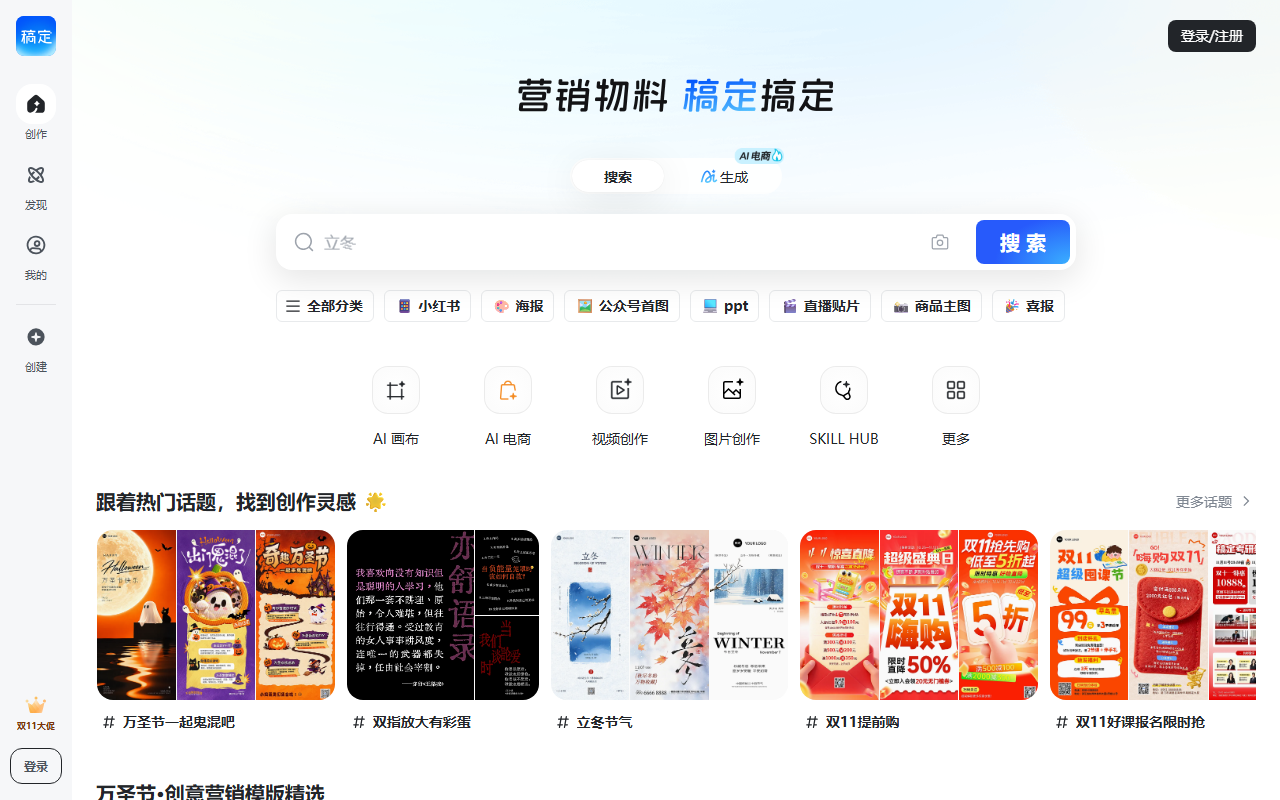
What Is Gaoding Design
Gaoding Design is an AI-powered online design tool built for people without a design background. It puts copywriting, layout generation, image creation, and photo retouching into a single editor, so instead of learning software like Photoshop you can type a topic or a few keywords and walk away with ready-to-use visuals such as posters, slide decks, and video covers.
What separates it from a plain text-to-image generator is its focus on finished deliverables. The output is not an isolated picture but a layered layout you can edit, swap text and images into, and export straight to publishing. On the asset side it provides 200,000+ image and video templates, 90 million+ commercially licensed stock assets, 1,000+ licensed fonts, and 5,000+ licensed audio tracks, covering design needs across self-media, e-commerce, education, and training.
Key Capabilities
AI Copywriting
Enter keywords and the tool drafts a customized headline and supporting notes, useful for video scripts, social posts, and marketing copy. For workflows where text comes before layout, this removes the back-and-forth of moving drafts between a writing app and a design app.
AI Design
Type a topic and it automatically generates finished layouts in different compositions, such as large-type covers, portrait covers, and science-comparison covers. You pick a direction, then replace the text and images to finalize. Compared with starting from a blank canvas, this hands the most time-consuming step - composition - to the algorithm.
AI Drawing
A rich set of effects is available for generating images in distinctive styles such as anime, avatars, and illustration, to serve as the main visual or as supporting elements inside a layout.
AI Photo Editing
Supports precise cutout, smart removal of unwanted strokes, sharpness enhancement, and image space expansion. Common jobs like changing an e-commerce product background, erasing an unwanted object, or upscaling a low-resolution asset can be handled directly in the editor.
Poster and Image Editing
- Poster making: multi-layer design, no Photoshop needed; swap text and images and generate a poster in one click.
- Image annotation: stickers, wireframes, mosaics, masks, QR codes, labels, arrows, and more, to match different visual styles.
- Image editing: smart cropping, preset sizes, new canvas, watermarking, and artistic fonts.
- Collage and video stitching: 200+ layout options, with collage poster templates applied in one click.
- Video creation: template-based editing where you only swap in your material, suited to content creators and merchants who need video quickly.
A Very Large Template and Asset Library
The library includes 200,000+ image and video templates, 90 million+ commercially licensed assets, 1,000+ licensed fonts, and 5,000+ licensed audio tracks. In practice this means most everyday scenarios do not require designing from scratch - you find a comparable template and rewrite the copy.
Original Protection and a Hot-Event Calendar
The platform works with over a thousand designers and refreshes original assets daily to help reduce copyright risk. A hot-event calendar keeps holiday marketing templates up to date so campaigns stay timely.
Scenario Templates Across Industries
Templates are organized by purpose: self-media visuals cover article images, trending-topic graphics, and holiday posters; merchant visuals cover new-product launches, sales-result graphics, social sharing images, and promotional posters; creative design covers invitations, greeting cards, and event invites; education covers enrollment graphics, course promos, and instructor announcement images; fan support covers support posters, phone wallpapers, and itinerary graphics.
Team Collaboration
Shared assets and flexible management let a team maintain templates and brand assets centrally, which raises overall output and keeps material safe.
How to Use
- Fix the purpose and size: decide first whether you need a poster, a video cover, or a social image, and lock the dimensions so you do not have to re-crop later.
- Draft the copy with AI: feed topic keywords into AI Copywriting, get a headline and body draft, then verify the facts and tone yourself before finalizing.
- Generate or pick a layout: search industry templates directly, or type a topic and let AI Design produce cover options, then choose a direction.
- Swap text and images: replace copy and pictures in the multi-layer editor, adding wireframes, arrows, or QR codes where annotation is needed.
- Process material with AI editing: for images that need a background swap or blemish removal, run cutout, stroke removal, or sharpness enhancement before placing them into the layout.
- Export and publish: export once the preview looks right. On team projects, sync the file to the shared asset library for reuse.
Best-Fit Scenarios
- Daily self-media output: article images, cover graphics, and holiday posters - high-frequency work that templates well.
- E-commerce and local merchant marketing: new-product graphics, sales-result images, social sharing pictures, and promotional posters with a clear conversion goal.
- Education and training enrollment: enrollment graphics, course promos, and instructor announcement images produced quickly around intake cycles.
- Events and commemorative design: invitations, greeting cards, and event invites that need a sense of occasion without hiring a designer.
- Small team collaboration: teams that need unified templates, fonts, and brand assets instead of everyone improvising separately.
Limitations and Notes
- Library size changes over time: figures such as 200,000+ templates and 90 million+ assets come from the source material; actual availability shifts with version and time, so treat the in-app display as authoritative.
- Verify commercial licensing: assets are described as commercially licensed, but the actual scope varies by item - portrait rights, trademark usage, and resale of goods on demand differ significantly. Check the platform's license terms and keep records before commercial use.
- AI output needs human review: AI copy may produce wording that clashes with your brand, and AI-generated layouts and images need to be checked frame by frame, especially where portraits, logos, or data claims are involved.
- Fine typographic control is limited: templated editing trades control for speed. Complex layouts, print-grade precision, or strict brand guidelines may still require professional design software.
- Requires network and an account: as an online tool, editing, asset retrieval, and export all need connectivity, so offline use is not supported.
- Pricing and platform support are not covered: the source material provides no pricing, free-tier, or client-platform details; defer to the official documentation.
FAQ
How is Gaoding Design different from an ordinary AI image generator? An ordinary generator returns a single image, while Gaoding Design returns a layered, finished layout. Beyond AI drawing, it bundles AI copywriting, AI design, AI photo editing, plus poster making, image annotation, collage and video stitching, and video creation - the goal is a publishable poster or cover, not just a raw asset.
Can I design without knowing Photoshop? Yes. The product is built to bypass professional software: pick a template or type a topic to generate a layout, swap text and images, and export. Operations that used to require professional tools - cutout, stroke removal, sharpness enhancement - are one-click AI functions.
Are the assets safe for commercial use? The source describes 90 million+ commercially licensed assets, 1,000+ licensed fonts, and 5,000+ licensed audio tracks, and the platform runs an original-protection program. Still, the boundary of "commercial" differs per asset. Where portraits, trademarks, or resale goods are involved, read the specific license first.
Can I use the finished design directly on online channels? In most cases yes. The editor supports preset sizes and multi-layer export, with templates for posters, video covers, and social images. If a channel has specific resolution, format, or file-size rules, check them before exporting.
How do we manage assets when several people use it? Use team collaboration to share assets and manage them flexibly. Keeping templates, fonts, and brand assets in one place prevents scattered versions and inconsistent styling across the team.
Frequently asked questions
How is Gaoding Design different from an ordinary AI image generator?
An ordinary generator returns a single image, while Gaoding Design returns a layered finished layout. It also bundles AI copywriting, AI design, AI photo editing, poster making, annotation, collage and video stitching, and video creation - the goal is a publishable asset.
Can I design without knowing Photoshop?
Yes. The product is built to bypass professional software: pick a template or type a topic to generate a layout, swap text and images, then export. Cutout, stroke removal, and sharpness enhancement are one-click AI functions.
Are the assets safe for commercial use?
The source describes 90 million+ commercially licensed assets, 1,000+ licensed fonts, and 5,000+ licensed audio tracks, and the platform runs an original-protection program. The boundary of commercial use differs per asset, so check the specific license for portraits, trademarks, or resale.
Can I use the finished design directly on online channels?
In most cases yes. The editor supports preset sizes and multi-layer export with templates for posters, video covers, and social images. Check the target channel's resolution, format, and file-size rules before exporting.
How do we manage assets when several people use it?
Use team collaboration to share and manage assets flexibly. Keeping templates, fonts, and brand assets in one place prevents scattered versions and inconsistent styling across the team.



