

The Google Cloud generative AI prompt gallery is an official online library of example prompts. It groups copy-ready templates into question answering, classification, code, extraction, summarization, transformation and generation tasks, with model parameters and bilingual examples to help write better prompts.
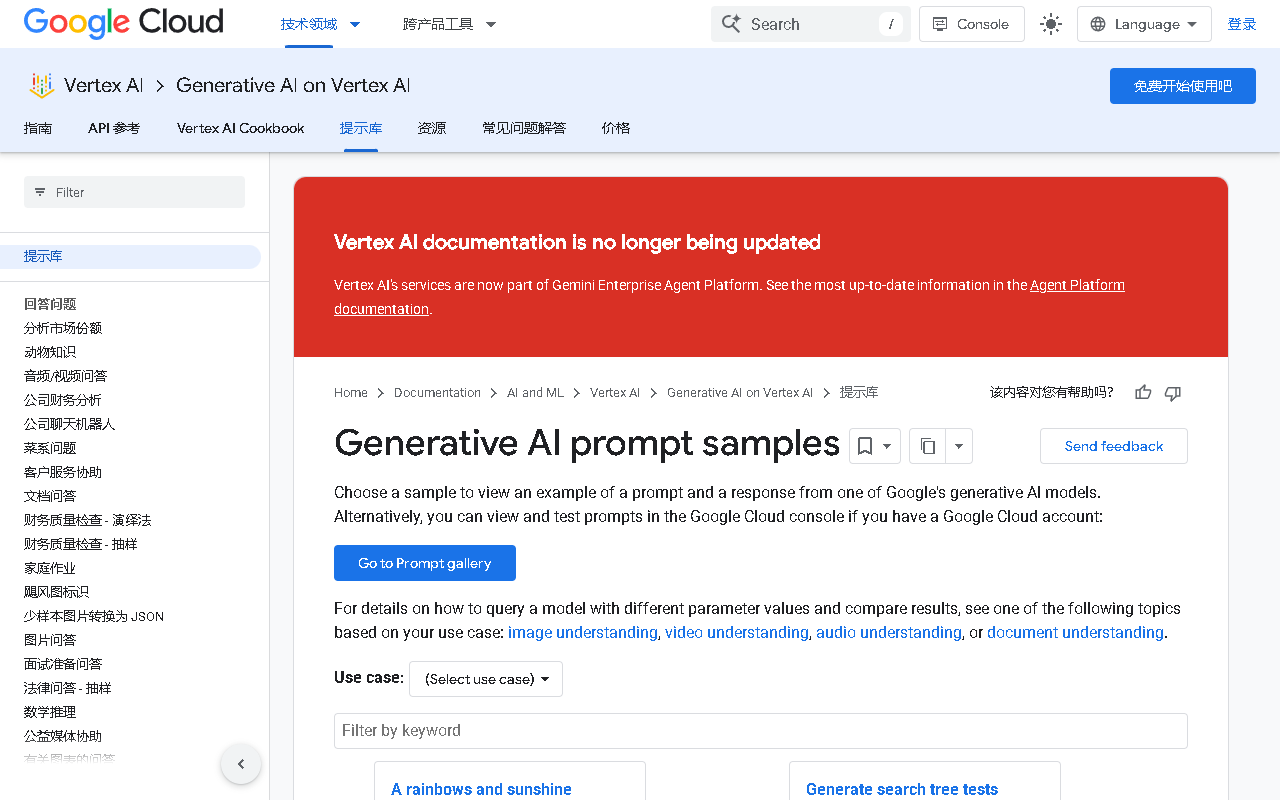
Google Cloud Generative AI Prompt Gallery: Official Free Prompt Templates
What it is
The Google Cloud generative AI prompt gallery is an official prompt resource that organizes common usage patterns into examples you can read and copy. The idea is practical: rather than starting from a blank page every time and guessing how to talk to a model, you can look at a curated set of templates and adapt one to your own scenario.

Main features
- A wide variety of templates: covering content creation, business analysis and workplace productivity, grouped by task type so you can find what you need.
- Model parameters included: each template lists suggested model parameters, cutting down the trial and error of setting things up.
- Bilingual examples: examples are available in English and Chinese, making it easier to understand the intent and adapt it locally.
- Free with no sign-in: prompts can be browsed and copied without registering an account.
- Best practices baked in: the templates demonstrate how to describe a task, constrain output format and supply context.
- Broad task coverage: text generation, data analysis, code assistance, content classification and customer service.
Task categories covered
- Question answering: document, video and audio Q&A, finance and company information Q&A, extracting the main issue from a customer complaint.
- Classification: splitting a recording by speaker, adding custom topic tags to news headlines, sorting video game terms into categories.
- Code: optimizing and explaining C++ code with attention to time complexity, training and evaluating a random forest model on sales data, reviewing form-handling code for bugs and security issues, migrating JavaScript to TypeScript.
- Extraction: turning long subjective passages into a concise list of objective facts, pulling key points and examples into a table, auto-filling form fields.
- Summarization: review summaries, travel and key-point condensation, turning a document into a presentation.
- Transformation: translating audio files, generating headlines for articles.
- Writing and generation: video ad copy, speeches, lesson plans, Europe itineraries, marketing content and educational quiz items.
How to use it
- Open the official page at https://cloud.google.com/vertex-ai/generative-ai/docs/prompt-gallery.
- Browse by task type: Q&A, classification, code, extraction, summarization, transformation, writing.
- Open an example and read both the prompt and the accompanying model parameters.
- Copy the template into the model or development environment you actually use.
- Replace the sample content with your own data, and add domain constraints plus output format requirements.
- Run it and iterate on wording, number of examples and parameters until the output is stable.
Use cases
- Marketing content: ad copy, social posts and campaign ideas.
- Software development: writing and optimizing code, generating test cases, explaining complex concepts.
- Education: teaching materials, lesson plans and interactive exercises.
- Customer service automation: handling common inquiries and extracting key issues from feedback.
Limitations and notes
- Templates are a starting point, not a guarantee: different models and versions react differently to the same prompt, so validate in your own environment.
- Output touching code, finance or legal topics needs human review, especially SQL, security checks and compliance-sensitive material.
- Bilingual coverage may be uneven; some examples lean toward one language and need translation or rewriting.
- Before pasting real business data into a template, confirm that the data may be sent to the model service you are using.
- The page and its templates change as the official docs evolve; check the source before relying on a specific example.
Frequently asked questions
Do I need to sign in or pay to use the gallery?
The material states that prompts can be browsed and copied for free, with no registration or sign-in required.
Which task types does the gallery cover?
Listed categories include question answering, classification, code, extraction, summarization, transformation and writing/generation, spanning text generation, data analysis, code assistance, content classification and customer service.
Can I use the listed model parameters as they are?
The templates ship with parameters as a starting point, but you should retest and adjust them for your own model, data and compliance requirements.
Is it suitable for someone new to prompting?
Yes. The material notes that the resource encodes best practices and bilingual examples, targeting both beginners and users with some experience.



