

Ideogram AI suits creators who need photorealistic images, posters, logos, or social media graphics quickly, as well as design tasks that combine text with images or need multiple variations from existing material.
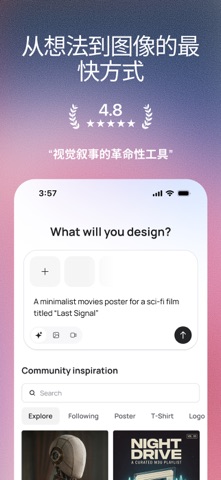
Ideogram AI: Generate Images and Design Drafts in a Few Seconds
Ideogram AI is an AI image generation application whose core capability is turning text descriptions into images and design pieces in a very short time. Its use goes beyond "generating one picture": photorealistic images, design posters, logos, and social media content are all included, which makes it closer to a lightweight design tool than a pure drawing model. What supports those outputs is a set of concrete capabilities — multi-style selection, image upscaling, automatic prompt improvement, community exploration, remixing, and professional typography. For people who need visual material quickly, it pushes down the time cost of both "thinking through the picture" and "waiting for the render."
Main Features
Multiple Unique Styles It offers photorealistic, design, 3D, and anime styles, so you can pick the style that fits your needs and preferences before generating. The style option determines the overall look of the output, and choosing the style first and writing the prompt second is usually more efficient.
Image Upscaling It can upscale images to enhance details and raise resolution, making the result clearer. This is especially useful when the output needs to work in print or at large sizes, because the resolution available at generation time often does not match the final usage requirement.
Magic Prompt It automatically improves your text prompt to help produce images that better match what you had in mind. It addresses the problem of unclear prompts, filling vague descriptions out into more specific scene descriptions.
Active Community Exploration You discover new ideas and inspiration through the active community in the Explore tab. For people who are unsure which style they want, looking at what others have finished often finds a direction faster than repeatedly tuning parameters.
Custom Color Palettes It lets you define your own color palette to create the atmosphere you want and make the work more personal. Color is the fastest lever for giving a piece its own sense of identity.
Remixing Images It can remix an existing image to create novel and distinctive designs. This path suits working on variations from material you already have, and it reaches results faster than generating from scratch.
Professional Typography It can create professional typography in designs such as posters and cards, improving the overall result of the piece. Combining image and text layout is the hard part of poster-style design, and this capability decides whether the finished piece is usable as is.
Usage Steps
- Clarify the purpose: First decide whether you are making a photorealistic image, a poster, a logo, or social media material — the prompt wording and style choices differ a lot across the four.
- Choose a style: Settle on a direction among photorealistic, design, 3D, anime, and the other styles.
- Write the prompt: Describe the subject of the image, the scene, and the atmosphere. You can use Magic Prompt to make the prompt more specific.
- Generate and filter: Once images come out, pick the composition closest to your goal from the multiple versions.
- Remix or adjust: When a result is not satisfying, remix it to generate variations, or adjust the atmosphere through a custom color palette.
- Upscale for resolution: After the final version is decided, upscale it to meet the size requirements for use.
- Finish typography and export: Posters and cards still need typography to be completed before you export the finished piece.
Use Cases
- Needing to produce photorealistic images or artwork quickly
- Designing posters, cards, and other materials that combine text and images
- Early exploration of logo and brand visual concepts
- Everyday imagery production for social media content
- Needing several variations from image material you already have
- Finding directions and inspiration from community work
Limitations and Notes
- AI-generated images contain detail errors, and text layout in particular tends to produce spelling mistakes, so check word by word before exporting.
- Image upscaling improves clarity, but it cannot fix structural errors that already existed at the generation stage.
- Magic Prompt is an automatic rewrite, and the rewritten result may not match your original intent; check the prompt content yourself for important visuals.
- A custom color palette affects the overall atmosphere, and after changing it you may need to re-evaluate the contrast between text and background.
- Copyright and commercial scope for generated content must follow the platform terms, so confirm the usage boundary before publishing.
- Community work is for reference only; confirm the licensing situation before copying someone else's creative idea.
Frequently asked questions
What types of content can Ideogram AI generate?
Ideogram AI can generate photorealistic images, design posters, logos, and social media content, supporting photorealistic, design, 3D, and anime styles. After generation you can upscale an image to raise its resolution, adjust the atmosphere with a custom color palette, remix existing material to produce variations, and complete professional typography for poster and card designs.
What problems do Magic Prompt and image upscaling solve?
Magic Prompt automatically improves the text prompt you enter, expanding vague descriptions into more specific scene descriptions. It helps with prompts that are hard to express, but the rewritten result may not fully match your original intent, so important visuals should be checked by hand. Image upscaling raises clarity and resolution to meet print or large-size requirements, but it cannot repair structural errors that already existed at generation time.
What should I watch out for when using AI-generated designs?
AI-generated images contain detail errors, and text layout in particular tends to produce spelling mistakes, so check word by word before exporting. A custom color palette changes the overall atmosphere, so contrast between text and background should be re-evaluated afterwards. Copyright and commercial scope for generated content must follow the platform terms, and community work is for reference only — confirm licensing before copying someone else's creative idea.



