

Kapi Camera is for users who enjoy nostalgic image styles. It lets them preview DV, CCD and film effects before taking a photo and adjust the look with filters.
What is Kapi Camera?
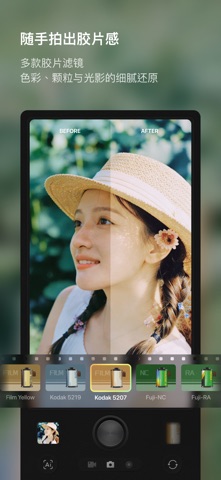
Kapi Camera is a photography app focused on retro image styles. Its product description says it was introduced by SenseTime and offers DV, CCD and film-inspired looks that change a photo's color and overall atmosphere. Users can preview effects while shooting and adjust framing or available settings before taking a picture. Specific filters, camera looks and controls may change between app versions, so check the current interface.
Main features
- Retro camera looks: Try DV, CCD and film-inspired effects for photos with a nostalgic or early-digital feel.
- Filters and effects: Choose different visual treatments for portraits, street scenes and everyday moments.
- Live preview: See the selected filter before taking a shot, which can help adjust angle, light or settings.
- Simple workflow: The described flow centers on selecting a look, previewing it and taking a picture without complex setup.
How to use it
- Install and open Kapi Camera on a currently supported device. Review the app's camera and storage permission prompts.
- Choose a DV, CCD or film-style filter based on the subject and lighting, then inspect the live colors, contrast and texture.
- Adjust framing, light and available controls. If skin tones, shadows or highlights look off, switch the filter or change the camera angle.
- After taking a photo, review the original and processed result. Check clarity, subject details and color balance before saving or sharing.
- For public or commercial use, confirm permissions for people, locations and other elements in the photo and follow the rules of the destination platform.
Good use cases
Kapi Camera may suit people who like nostalgic photography and want to try different looks quickly. It can be used for everyday memories, travel, portraits or street photography. Live preview makes it easier to compare styles before taking a shot. The app focuses on filters and image atmosphere rather than replacing a camera's full manual controls or a complete editing workflow.
Limits and tips
A filter changes color and texture but cannot guarantee that every photo will look like a particular historical camera. Lighting, lens, subject and display all affect the result. If accurate color is important, such as for product images or identification photos, avoid strong filters and keep an unedited copy. Before sharing, check privacy details and image permissions; review important photos on the target screen or platform.
Frequently asked questions
Which looks can Kapi Camera simulate?
The product description mentions DV, CCD and film-style looks, along with a selection of retro filters and effects.
Can I preview a filter before taking a photo?
The product description says live preview is available. Exact effects and controls depend on the current app version.
What is it useful for?
It can be used for everyday photography, portraits, street scenes and other shots where a nostalgic visual style is desired.



