

If you want a phone shooting tool built around "getting a standout shot with minimal effort", the core value of the Kapi Camera app latest version is this: AI judges the scene, subject and time before you press the shutter and suggests filters, composition and poses; at the same time, Log curves, LUTs, film simulation and 40+ retro filters push a cinematic straight-out look, while passer-by removal, sky replacement, super-resolution, old photo restoration, album classification and social sharing complete the post-shooting chain.
What Is the Kapi Camera App Latest Version?
The subject of this page is the Kapi Camera app (Kapi相机), an AI photo assistant app under SenseTime whose overseas version is called Kapi Cam. According to the available facts, it is built on SenseTime's RiRiXin multimodal large model, and its focus is not simply stacking shooting parameters but linking "recognize – suggest – shoot – retouch – organize – share" into one phone-based photo workflow.
Its stance on image style is clear: it recreates the Apple Log curve and iPhone Cinematic mode, and supports Log curves, LUTs and film simulation. The goal is to reduce the "digital look" of straight-out images so ordinary users can get closer to a "one-tap cinematic" experience.
One-Sentence Answer
The Kapi Camera app latest version suits users who want to adjust fewer parameters, get usable shots quickly and favor a film or cinematic mood; it uses 1–2 second smart recognition to help with composition and filter choice, then closes the loop from shooting to sharing with 40+ retro filters, AI retouching and smart albums.
Product Positioning
Who It's For
- Photography beginners: they need scene judgment, composition reminders and pose suggestions before shooting.
- Retro imaging fans: they care about classic camera and film looks from Fujifilm, Kodak, Leica and others, as well as DV, CCD and film-camera textures.
- Social sharing users: they want to retouch quickly, add atmospheric light effects and publish right after shooting.
- People organizing old photos: they will use old photo restoration, image super-resolution and automatic classification.
How It Differs from an Ordinary Camera App
Ordinary camera apps emphasize shooting control, while the facts about the Kapi Camera app latest version center on "AI-assisted decision making". Before the shot it identifies the shooting scene, subject, people and time, then recommends the optimal filter, composition and pose suggestions in real time; afterwards it brings AI removal of passers-by/clutter, AI sky replacement, image super-resolution, old photo restoration, and creative content and sticker/meme generation into the same product story.
Core Features
AI Smart Shooting Assistance
Before shooting, it can identify the shooting scene, subject, people and time within 1–2 seconds and recommend the optimal filter, composition and pose suggestions in real time. For beginners, the point of this capability is to reduce the hesitation over "what to shoot, how to stand and which style to use".
Cinematic Straight-Out Quality
The product recreates the Apple Log curve and iPhone Cinematic mode and supports Log curves, LUTs and film simulation. Published material describes this as a way to say goodbye to the "digital look", which suits users who prefer a cinematic feel, minimal-intervention straight-out images and a consistent color style.
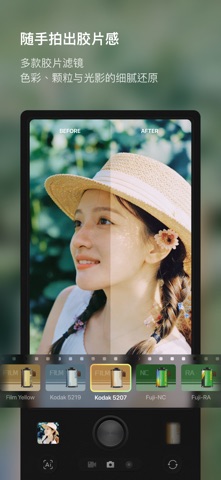
A Library of 40+ Retro Filters
It includes 40+ built-in retro filters covering classic camera and film styles from Fujifilm, Kodak, Leica and others, and can simulate textures such as DV, CCD and film cameras. When choosing a filter, it is better not to go by the name alone; compare skin tones, shadows, grain and highlight clipping in the same scene.
AI Retouching and Creative Remixing
It supports AI removal of passers-by/clutter, AI sky replacement, image super-resolution and old photo restoration, and can also generate creative content and sticker/meme content from photos. It works more like a tool that keeps processing after the shot than one that only matters at the moment you press the shutter.
Smart Album Management
The system can automatically recognize photo scenes and content and classify them, and also recommends suitable templates for the album based on scene recognition. For users with a large number of photos, the value here is less manual filing.
Ambient Light Effects and Special Effects
It offers atmospheric light effects and light-and-shadow effects such as vignettes and light spots, Hong Kong-style soft light and afterglow/sunset light to strengthen the mood of a photo. Use them in moderation so that the edges of a portrait, the sky area or shadow detail are not covered up by the effect.
Simulated Camera Experience
The product simulates the interface and feel of physical cameras such as Canon, providing an immersive retro shooting experience. It suits users who enjoy the "ceremony" of a camera, but whether it fits your own habits still depends on hands-on experience.
One-Tap Social Sharing
Processed photos can be shared directly to social platforms, with personalized captions added. The fact list does not include a specific list of supported platforms, so the sharing scope depends on the actual entries in the app.
How to Use It
The following is a general getting-started path based on how the features logically fit together; exact button names, entry order and available options may change with the version:
- Open the Kapi Camera app latest version and first check camera permission, album permission and network status so that AI recognition, cloud processing or sharing are not restricted.
- In the shooting screen, point the lens at your subject and watch for recognition prompts related to scene, subject, people or time.
- Once the 1–2 second assistance appears, look at three things first: whether the recommended filter matches the light, whether the composition guides help place the subject, and whether the pose suggestions suit the number of people in the frame.
- If you want a cinematic look, switch to the shooting/color options related to the Apple Log curve, iPhone Cinematic mode, Log curves, LUTs or film simulation, and compare in the same scene before deciding.
- For a retro look, filter the 40+ filters using two lines of thinking — "Fujifilm, Kodak, Leica" and "DV, CCD, film camera" — and avoid stacking too many effects at once.
- After shooting, go into editing and use AI removal of passers-by/clutter, AI sky replacement, image super-resolution or old photo restoration as needed; judge restoration strength separately for portraits and landscapes.
- For creative remixing, you can generate creative content and sticker/meme content from the photo, then check whether subject edges, text areas and the replaced sky look natural.
- Use the smart album to review automatic classification results and confirm whether scene recognition is accurate; when you want to publish, use one-tap sharing and add a personalized caption.
Use Cases
- Travel street photography: in complex light such as backlight, dusk or street blocks, let the AI identify the scene first, then choose between retro filters and cinematic curves.
- Portraits and group photos: pose and composition suggestions can lower the cost of directing for beginners, and AI removal of passers-by/clutter can clean up the background afterwards.
- Organizing old photos: old photo restoration and image super-resolution suit needs such as digitizing paper photos and refreshing family albums.
- Atmospheric content: vignettes and light spots, Hong Kong-style soft light and afterglow/sunset light suit themes such as night scenes, cafes and seaside sunsets, but keep the intensity under control.
- Quick social posting: the chain from filter and retouching to captions and sharing is short, which suits users who update photos frequently.
Pros
- Assistance comes first: many tools only work in post, while the Kapi Camera app latest version puts recognition and suggestions before the shot, emphasizing filter, composition and pose direction within 1–2 seconds.
- Style assets are centralized: 40+ retro filters and style descriptions covering Fujifilm, Kodak, Leica, DV, CCD and film cameras are gathered in one place, which helps keep a consistent look.
- The cinematic path is clear: the Apple Log curve, iPhone Cinematic mode, Log curves, LUTs and film simulation all point toward a straight-out goal with less "digital look".
- Wide post-production coverage: AI removal of passers-by/clutter, AI sky replacement, image super-resolution, old photo restoration, and creative content and sticker/meme generation cover retouching and light creative work.
- A complete management chain: the smart album can automatically recognize and classify photo scenes and content, and can recommend suitable templates based on scene recognition.
Limitations
- The fact list does not provide pricing, subscription tiers, free quotas or in-app purchases, so long-term cost cannot be judged.
- The fact list does not provide a valid official website URL, nor app store pages, system requirements, supported devices or regional availability; these need to be verified before downloading.
- Wording such as "1–2 second recognition", "cinematic straight-out quality" and "accurately recreates" comes from published factual descriptions; actual results will be affected by light, device processing power, the subject and version policy.
- Retro filters and the simulated camera experience are about style and feel and are not the same as the hardware imaging of real Fujifilm, Kodak, Leica or Canon equipment.
- AI sky replacement, removing passers-by and old photo restoration may leave edge artifacts, repeated textures or unnatural sky perspective; zoom in and check before publishing.
Price Verification Note
The published fact list does not give the price of the Kapi Camera app latest version, the free/paid boundary, subscription periods or promotions, so this page draws no pricing conclusion. Please rely on what the official website or the app store listing shows on the day you download; if there is a free trial, auto-renewal, paid filter packs or AI feature quotas, check the billing cycle, cancellation entry point and regional differences before paying.
Official Website and First-Hand Source Note
In this published fact list, officialUrl, sourceUrl and canonicalUrl are all empty, and no verifiable official website URL was provided, so no speculative links are included. We suggest searching for "Kapi相机" or the overseas name "Kapi Cam" in a legitimate app store, checking whether the developer entity is shown as related to SenseTime, and reviewing the in-app version number, privacy policy and update date.
FAQ
Q1: What is the relationship between the Kapi Camera app latest version and Kapi Cam?
The published fact list states: Kapi Camera (Kapi相机) is an AI photo assistant app under SenseTime, and its overseas version is called Kapi Cam. The names differ but refer to the same product subject; exact regional version differences should be confirmed on the download page.
Q2: Can it really give shooting suggestions within 1–2 seconds?
The fact list describes it as follows: before shooting, it identifies the shooting scene, subject, people and time within 1–2 seconds and recommends the optimal filter, composition and pose suggestions in real time. Actual speed may be affected by device performance, network, light and version, so it is best to test on your own phone.
Q3: How many filters are there, and what styles are included?
Published information states that it includes 40+ built-in retro filters covering classic camera and film styles from Fujifilm, Kodak, Leica and others, and simulating textures such as DV, CCD and film cameras.
Q4: Can it replace a professional camera or professional color grading software?
No conclusion can be drawn on that basis. Its strength is lowering the barrier to phone shooting and light post-production; professional camera hardware, lens systems, RAW workflows and fine-grained color grading are not covered in the fact list, so whether it is enough depends on your output size, printing needs and commercial delivery standards.
Q5: What AI retouching capabilities does it include?
The capabilities listed in the fact list include AI removal of passers-by/clutter, AI sky replacement, image super-resolution, old photo restoration, and generating creative content and sticker/meme content from photos. Before using them, keep the original photo so you can roll back if you are not satisfied.
Alternatives
Although the published fact list has a heading for "apps similar to the Kapi Camera app", it does not list any specific alternative product names, so no competitors are invented. You can compare along three lines of thinking:
- The system camera plus manual post-processing: suits people who value native image quality, RAW workflows and precise color management.
- Retro-filter tools: compare mainly the number of filters, grain control, skin-tone stability and whether LUTs are supported.
- AI retouching tools: compare mainly passer-by removal, sky-replacement edges, super-resolution detail, old photo restoration and batch processing.
When choosing an alternative, test all candidates with the same portrait, the same night scene and the same set of old photos to see whether the filters hold up over time, whether AI edges are clean and whether the sharing path is smooth, then decide whether to switch.
Frequently asked questions
What is the relationship between the Kapi Camera app latest version and Kapi Cam?
The published fact list states: Kapi Camera (Kapi相机) is an AI photo assistant app under SenseTime, and its overseas version is called Kapi Cam. The names differ but refer to the same product subject; exact regional version differences should be confirmed on the download page.
Can it really give shooting suggestions within 1–2 seconds?
The fact list describes it as follows: before shooting, it identifies the shooting scene, subject, people and time within 1–2 seconds and recommends the optimal filter, composition and pose suggestions in real time. Actual speed may be affected by device performance, network, light and version, so it is best to test on your own phone.
How many filters are there, and what styles are included?
Published information states that it includes 40+ built-in retro filters covering classic camera and film styles from Fujifilm, Kodak, Leica and others, and simulating textures such as DV, CCD and film cameras.
Can it replace a professional camera or professional color grading software?
No conclusion can be drawn on that basis. Its strength is lowering the barrier to phone shooting and light post-production; professional camera hardware, lens systems, RAW workflows and fine-grained color grading are not covered in the fact list, so whether it is enough depends on your output size, printing needs and commercial delivery standards.
What AI retouching capabilities does it include?
The capabilities listed in the fact list include AI removal of passers-by/clutter, AI sky replacement, image super-resolution, old photo restoration, and generating creative content and sticker/meme content from photos. Before using them, keep the original photo so you can roll back if you are not satisfied.
Where can I verify pricing, the official website and availability?
This published fact list provides no pricing, and officialUrl, sourceUrl and canonicalUrl are all empty, so no pricing conclusion or speculative links can be given. Please search for "Kapi相机" or the overseas name "Kapi Cam" in a legitimate app store and check the developer entity, version number, privacy policy, in-app purchases, auto-renewal terms and regional availability.



