

Meta AI is an AI chat assistant app from Meta. It supports natural text and voice conversation with personalised answers, suggestions and ideas, lets you create, edit and restyle images inside the app, runs a Discover channel of community AI prompts, and for Ray-Ban Meta owners handles device management plus photo and video import and sharing.
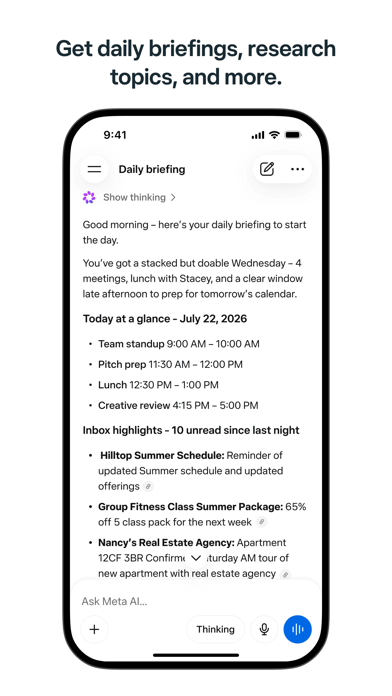
Meta AI app: a chat assistant that also generates images and manages your smart glasses
Meta AI is the AI chat assistant app from Meta. It holds natural, flowing conversations and returns personalised answers, suggestions and ideas; input can be typed or spoken, and images can be created, edited and adjusted inside the app. A Discover channel collects AI ideas and prompts from the community, and for people who own Ray-Ban Meta glasses the app handles device management plus photo and video import and sharing.
Its position among similar products is unusual. Rather than a single chat window on the web, it is a mobile app that places three entry points side by side: asking, making images, and handling hardware. In one place you can ask a question, have the idea drawn, then pull in a photo the glasses just took and share it, without switching tools in between.
That combination sets the rhythm of use. A pure Q&A assistant stops at helping you think; Meta AI also has to help you produce and pass on. Image creation and editing cover producing; Ray-Ban Meta import and sharing cover passing on; the Discover channel supplies starting points for moments when you have no clear question yet. Below, the five listed features are unpacked one by one, with a note on where each fits.
Five main features
Natural conversation, typed or spoken
You can talk to the assistant in text or simply speak. The official description stresses personalised answers, suggestions and ideas rather than dictionary-style definitions, which makes it a better fit for open questions such as which option to pick or whether another angle exists than for looking up a single fixed fact. Voice input earns its place when your hands are busy: walking, cooking, commuting.
Content creation and editing: generate, modify, restyle
The app supports image creation, editing and style adjustment, with prompt ideas to start from. In practice it runs in three steps: generate a base image from a sentence, revise the parts that miss, then adjust the overall style closer to what you had in mind. Keeping generation and editing in one conversation means the context is never lost, so you are not restating the brief each time.
Device management for Ray-Ban Meta glasses
If you own Ray-Ban Meta glasses, the app handles device management and supports importing and sharing photos and videos. This turns the app from a content generator into a content entry point: footage from the glasses lands in the app first, and from there you decide whether to keep it, work on it, or send it to a friend. For people who record casually through the glasses all day, this removes cables, transfer utilities and format conversion.
Community interaction in the Discover channel
A Discover channel surfaces AI ideas and prompts from the community, which you can try and then adjust. Its value is a lower starting threshold: when you do not know how to phrase a request, borrow a prompt someone else has already validated and rewrite it for your own case. It also turns solitary use into a semi-open exchange of experience.
Voice control for quick actions
Beyond conversation, the app accepts voice commands for fast operation. This is not the same thing as spoken dialogue: dialogue is deliberation, commands are execution. The latter works more like a remote control and saves taps once you already know what you want done.
A typical path through the app
- Open the app and ask your question by text or voice to get an answer or a few possible directions.
- If the answer should become an image, hand the idea to the image feature for a first pass and request changes in the same conversation.
- Adjust the style until it lands close to the intended result, then save or share it.
- While wearing Ray-Ban Meta glasses, import the photos or videos you shot, pick the keepers and share them.
- When you have no specific question, browse the Discover channel, pick a community prompt and adapt it.
Who it suits
- People who want quick answers and ideas without opening a laptop, using voice to talk a problem through.
- Light content creators who need supporting images, covers or concept visuals made and revised in one place.
- Ray-Ban Meta owners who want footage from the glasses imported and shared quickly.
- Anyone who enjoys testing new prompts and reshaping community examples into their own workflow.
Limits to keep in mind
- The source does not disclose subscription pricing, free quota or paid tiers, nor whether availability is simultaneous across regions. Confirm the actual scope inside the app.
- The underlying model version, context length and per-generation limits are not stated, so long-document handling should not be inferred from other assistants.
- Device management features require Ray-Ban Meta glasses; without that hardware this part of the app is unavailable.
- Commercial licensing terms and watermark rules for generated and edited images are not described. Verify the terms before any commercial publication.
- No web or desktop client is mentioned and supported operating system versions are not listed, so check before relying on cross-device use.
Frequently asked questions
What is Meta AI?
An AI chat assistant app from Meta that supports text and voice conversation, returns personalised answers, suggestions and ideas, and can create, edit and adjust images inside the app.
Can I use voice?
Yes. Alongside text input the app supports spoken conversation and voice commands for quick actions.
Does it work without Ray-Ban Meta glasses?
Conversation, image creation and the Discover channel do not depend on the glasses. Device management and photo or video import require Ray-Ban Meta hardware.
What is the Discover channel?
A channel that gathers AI ideas and prompts from the community, which users can try and then adjust.
Frequently asked questions
What is Meta AI?
An AI chat assistant app from Meta that supports text and voice conversation, returns personalised answers, suggestions and ideas, and can create, edit and adjust images inside the app.
Can I use voice?
Yes. Alongside text input the app supports spoken conversation and voice commands for quick actions.
Does it work without Ray-Ban Meta glasses?
Conversation, image creation and the Discover channel do not depend on the glasses. Device management and photo or video import require Ray-Ban Meta hardware.
What is the Discover channel?
A channel that gathers AI ideas and prompts from the community, which users can try and then adjust.



