

PixoLet is an AI tool for e-commerce sellers that creates product images and videos from a single uploaded photo plus a natural-language description, powered by the GPT-image-2.5 model.
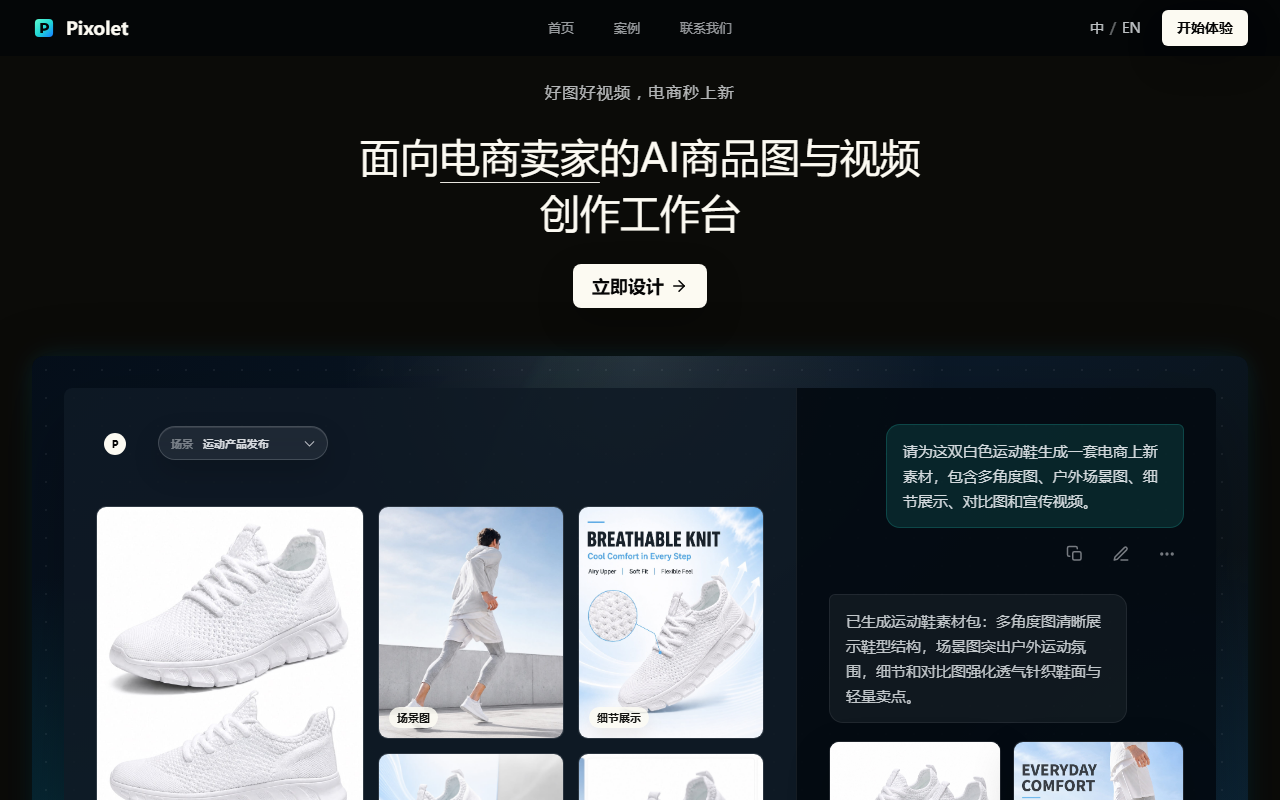
PixoLet: An AI Workspace for E-commerce Product Images and Videos
What Is PixoLet
PixoLet is an AI tool built for e-commerce sellers that creates product images and videos. It runs on the GPT-image-2.5 model. You upload a single product photo and describe what you want in plain language, and PixoLet quickly produces a full set of e-commerce assets: hero images, scene shots, model photos, detail-page graphics, marketing posters, and viral-hit replicas. It supports multi-turn conversational editing, preserves more than 90% of the product's original detail, and renders text clearly—making it a strong fit for sellers who launch new items often, have a small design team, or want to test creatives on a low budget.
Main Features
- Hero image generation: Upload a product photo to produce high-quality main images, replacing traditional photoshoots and retouching.
- Model shots: Create on-model images without a real photoshoot, with control over gender, scene, and full-body or half-body framing.
- Viral-hit replica: Upload a best-selling reference image plus your own product photo to replicate the same eye-catching look.
- Multi-turn conversational editing: Refine the previous version by swapping models, changing backgrounds, adding or removing elements, and editing copy or fonts—no more endless re-rolls.
- High-fidelity detail: Keeps over 90% of the lighting, material, and texture detail from the reference, avoiding "wrong product" results.
- Clear text rendering: Labels and small text in the image stay legible, so manual text fixes are rarely needed.
- Multi-size output: Offers aspect ratios of 1:1, 3:2, 4:3, 16:9, and 9:16 at 1K/2K/4K resolution for every platform's placements.
How to Use PixoLet
- Visit the site: Go to the PixoLet website at https://www.pixolet.ai/ and sign up to log in.
- Upload a reference: Upload a product photo—a white-background shot or even a quick snapshot both work.
- Describe your need: Say what you want in natural language, e.g., "create two foreign-model shots, one full-body and one half-body close-up."
- Wait for generation: Let the AI fill in the details automatically.
- Refine in multiple rounds: If you're not happy, just keep telling it what to change on the previous version, like "switch to an Asian female model," "change the background locally," or "edit the copy."
- Pick the spec: Choose aspect ratios like 1:1 or 16:9 and a resolution of 1K/2K/4K as needed.
- Download and use: Confirm the result, download it, and use it across hero images, detail pages, posters, and more.
Core Advantages
- Zero learning curve: No Photoshop and no complex prompts required—just describe your need in everyday words.
- Fast turnaround: One product photo quickly yields a whole set of e-commerce assets, so you catch launch windows and trend spikes.
- Stable multi-round editing: Edit continuously on top of the previous version, avoiding "fix one thing, break everything" and repeated re-rolls.
- High-fidelity detail: Preserves over 90% of lighting and texture detail, so results stay true to the product.
- Clear text rendering: Small text and labels stay readable, with almost no manual rework.
- Full-scenario coverage: Hero images, scene shots, model photos, detail pages, posters, and viral replicas in one place, at multiple sizes for every platform.
Comparison with Meitu Design
| Dimension | PixoLet | Meitu Design |
|---|---|---|
| Positioning | An AI tool made for e-commerce sellers, focused on "one photo to a full set of assets" | A general AI design platform covering e-commerce, posters, social media, and more |
| Underlying model | Runs on GPT-image-2.5 with strong world knowledge and better natural-language understanding | Built on Meitu's in-house AI models, with deep expertise in portrait beautification |
| Ease of use | No prompt skills needed—plain-language description suffices | Mostly template-driven, with some features still needing manual design tweaks |
| Multi-round editing | Conversational, continuous editing; changing backgrounds, models, or copy stays stable | Template application and local tools dominate; weaker continuous conversational editing |
| Product detail retention | Keeps over 90% of lighting and texture detail | Focuses on portrait beautification; product detail fidelity is not the core pitch |
| Text rendering | Small text and labels stay legible | Text relies on templates or manual addition |
| Viral-hit replica | Upload a hit image plus your product to replicate directly | No directly equivalent viral-replica feature |
Use Cases
- Cross-border apparel launches: Upload a white-background shot to generate foreign-model on-body images, saving cross-border sellers steep model-shoot costs.
- Urgent promo creatives: During big sales like 11.11 when designers are booked, sellers can self-serve hero images and posters to hit the event window.
- Fast viral testing: Upload a competitor's hit image with your own product to replicate the style and A/B test click-through quickly.
- Factory-to-retail: Rebuild raw factory floor photos into professional product scenes, helping 1688 factories move into retail at low cost.
- Omnichannel distribution: Generate 1:1, 9:16, and 16:9 assets in one go for livestreams, short videos, and detail pages.
FAQ
Do I need to write prompts for PixoLet? No. It's built for zero friction—just describe your need in plain language. No Photoshop or complex prompt skills required.
Will the generated images keep the product's detail? Yes. PixoLet preserves over 90% of the lighting, material, and texture detail from the reference, and text labels stay legible, reducing mismatches and rework.
Is it good for small sellers? Absolutely. It's made for sellers who launch fast, lack design help, or want low-cost creative testing. One product photo produces a full set of e-commerce assets—hero images, model shots, posters, and viral replicas.
Frequently asked questions
Do I need to write prompts for PixoLet?
No. It is built for zero friction—just describe your need in plain language. No Photoshop or complex prompt skills are required.
Will the generated images keep the product's detail?
Yes. PixoLet preserves over 90% of the lighting, material, and texture detail from the reference, and text labels stay legible, reducing mismatches and manual rework.
Is it good for small sellers?
Absolutely. It is made for sellers who launch fast, lack design help, or want low-cost creative testing. One product photo produces a full set of e-commerce assets.



