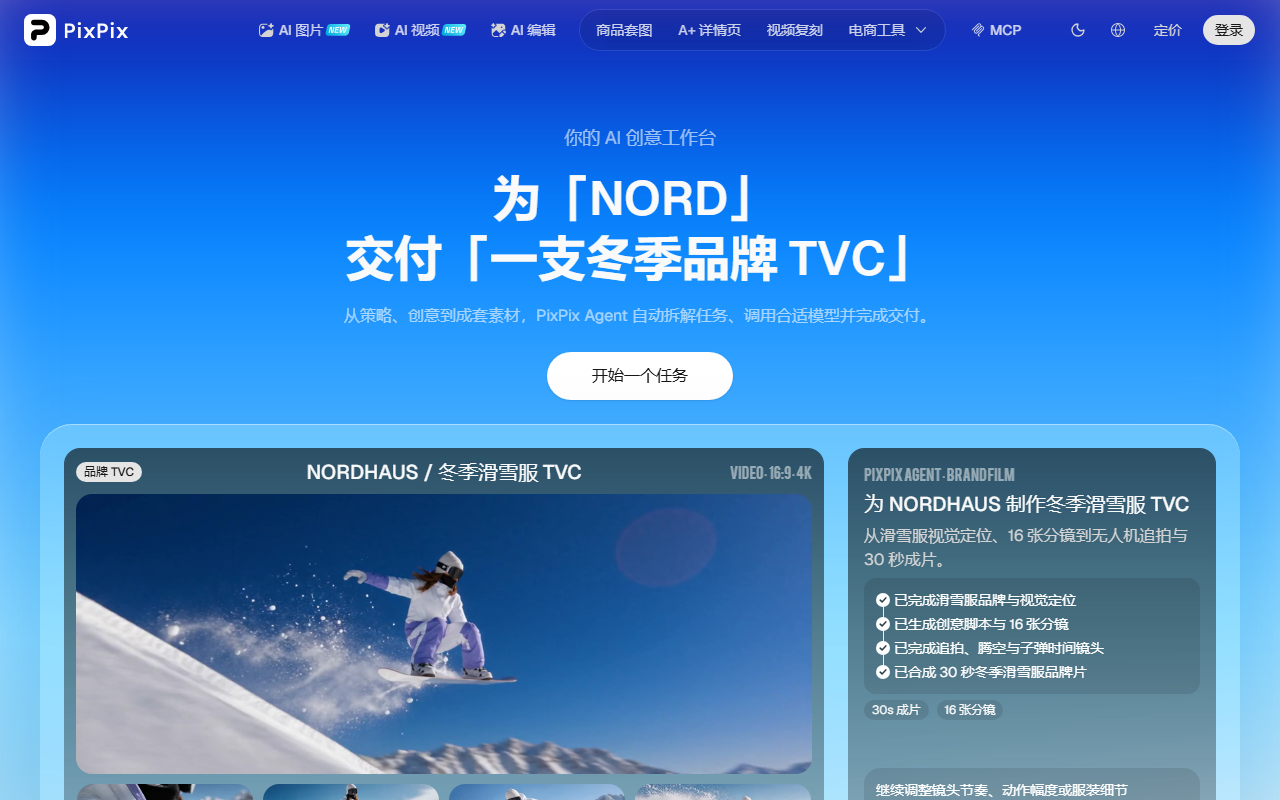
PixPix is a web-based AI image and video creation platform for cross-border e-commerce sellers and operations teams. Its core approach is aggregating multi-vendor models such as GPT Image 2, Google Veo, Kuaishou Kling, and ByteDance Seedream into one workflow, allowing users to describe requirements in Chinese and complete image generation, video generation, editing and refinement, and platform-compliant export.

PixPix has a clear positioning: it is not an art tool driven by a single model, but an end-to-end AI image and video creation platform built specifically for cross-border e-commerce sellers and operations teams. According to the provided fact sheet, PixPix uses a multi-vendor model aggregation strategy, bringing leading global AI models such as GPT Image 2, Google Veo, Kuaishou Kling, and ByteDance Seedream into one platform. Users can choose the best engine for each scenario, rather than being limited by any single model's ceiling. It currently aggregates 10 image generation models and 11 video generation models, serving nearly one million cross-border e-commerce sellers.
Positioning
PixPix is closer to an "AI creative workspace": from concept, storyboards, and images to video assets, as much as possible within one web-based system. The official site also uses the phrase "Your AI creative workspace" and emphasizes that the Agent plans the work, selects the right models, and delivers complete creative asset sets. For e-commerce teams, its value is not to replace every design tool, but to bring high-frequency, repetitive, platform-rule-heavy asset production into the browser.
Core Features
Multi-Model AI Image Generation
PixPix aggregates GPT Image 2, Google Nano Banana Pro, ByteDance Seedream 4.5, and other mainstream image models — 10 in total — supporting text-to-image, image-to-image, style transfer, and other image generation methods. The same request can be run across multiple models in parallel for comparison, making it easier to select the best result in terms of style, texture, and composition.
Multi-Model AI Video Generation
On the video side, PixPix integrates 11 video models, including Google Veo 3.1, Kuaishou Kling O1, and Alibaba HappyHorse 1.0, supporting text-to-video, image-to-video, product showcase videos, product pitch/voiceover videos, and more. It is designed for quickly producing short video assets for TikTok, Instagram, Amazon A+, and similar scenarios.
AI Agent Conversational Creation
The built-in Studio Agent panel supports multi-turn iterative dialogue. Users can describe what they want in Chinese, and the AI understands context and continuously refines image output. It also has project memory capabilities, remembering style preferences, brand colors, and historical assets, so style stays consistent across sessions.
General Image Editing Tools
No Photoshop is required. PixPix can handle 8 professional image editing tasks online: local inpainting, high-resolution upscaling, outpainting/expansion, background removal, object removal, crop and resize, perspective change, and annotation — covering the basic image operations e-commerce designers need every day.
E-Commerce Tool Suites and Dual-View Workspace
PixPix provides five scenario-specific tools: product image set generation, A+ detail page layout, apparel set images, product retouching, and hit product asset recreation. It is deeply adapted to the image specifications of 16 mainstream cross-border platforms, including Amazon, AliExpress, Shopify, and TikTok Shop. The workspace includes "Workbench" and "Infinite Canvas": the former is a linear, process-oriented layout suited for batch image generation; the latter is a free-form node-based canvas for multi-image composition and creative exploration. The same project can switch between views at any time, with data shared and not lost.
How to Use It
- Register and sign in: go to PixPix official website https://www.pixpix.com/?source=aibot%EF%BC%8C%E6%B3%A8%E5%86%8C%E8%B4%A6%E5%8F%B7%E5%B9%B6%E7%99%BB%E5%BD%95%E3%80%82
- Choose a workflow view: select "Workbench" for batch, process-based generation; select "Infinite Canvas" for free-form layout and creative exploration.
- Describe your request: in the Agent panel on the right, describe the desired image or video effect in Chinese, and the AI will understand and carry it out.
- Compare model results: the system recommends the most suitable model automatically, but you can manually switch among GPT Image, Google, ByteDance, Kuaishou, and other models to compare multiple versions and choose the best result.
- Refine and edit: use tools such as background removal, outpainting/expansion, retouching, and resizing for secondary editing until you are satisfied.
- Export and use: export in one click according to platform specifications and upload directly to Amazon, AliExpress, or other platform backends — no software installation is required throughout.
Use Cases
- Product main image generation: AI generates white-background images, lifestyle/scene images, and infographics that meet Amazon, AliExpress, Shopify, and other platform specifications, automatically adapting size and compliance.
- Detail pages and A+ content design: automatically lays out detail page modules, supports multilingual output, and adapts to Amazon A+ image-text requirements.
- Apparel batch image generation: batch-process on-model effect images, multi-color display images, and model sets for apparel, reducing repetitive color and outfit swapping work.
- Product video asset creation: generate short product videos from text descriptions, including voiceover videos, product showcase videos, and story/scene videos.
- Hit product asset recreation: reference competitor viral/hit image styles and generate similar but differentiated assets, helping keep current styles while reducing the risk of colliding or overly similar images.
Advantages
- Multi-model aggregation, broader effect choices: 10+ image models and 11+ video models can be switched freely; choose the best engine by scenario and compare multiple versions in parallel.
- Natural-language driven, low design barrier: describe your needs in Chinese; no professional design terminology or software skills required.
- Built-in platform specifications, one-click compliance: covers image specifications for 16 mainstream cross-border e-commerce platforms, automatically matching sizes and compliance when exporting.
- Project memory, consistent style: AI remembers across sessions, including brand colors, style preferences, and historical assets.
- Pure web app, ready when you need it: no software download or installation required; works in the browser on Windows and macOS.
Limitations and Usage Notes
The provided fact sheet does not disclose PixPix's specific pricing, free quota, commercial licensing details, API capabilities, team seat permissions, or ownership terms for generated assets. These are changeable and purchase-relevant details, so you should verify them on the official site before paying or commercial use. Real-world output is also affected by the selected model, prompt quality, source asset clarity, and platform rule updates. For important listing assets, it is still recommended to manually review copyright, trademarks, people/portrait rights, and platform compliance.
Price Verification Note
As of this writing, the fact sheet does not provide PixPix pricing, plans, free trial quota, or billing method, so it is not possible to determine whether it is free or paid. Please check the current official page at https://www.pixpix.com/?source=aibot and focus on: whether billing is per generation, whether images and videos are billed separately, whether personal and team versions differ, the scope of commercial licensing, whether export resolution is limited, and refund rules.
Official Website and Primary Sources
- Product website: https://www.pixpix.com/?source=aibot
- Official site positioning phrases include "Your AI creative workspace," and the site shows an example brand film flow from concept and 16 storyboards to a completed 30-second campaign film. These numbers are cited only as the official site's example, not a fixed output for all projects.
FAQ
See the structured FAQ below.
Alternatives
When evaluating alternatives, you can compare tools by three needs: if the priority is single-model image generation, compare official tools that directly use GPT Image, Google, ByteDance, or Kuaishou models; if the priority is traditional retouching, compare Photoshop-class image editing software; if the priority is e-commerce templates and batch listing images, compare e-commerce design tools aimed at Amazon, AliExpress, Shopify, and TikTok Shop. Suggested comparison dimensions include: number of models, Chinese-language Agent support, built-in export specifications for 16 platforms, web-based access, project memory, and whether image and video tasks can be completed on the same platform.
Frequently asked questions
Who is PixPix for?
PixPix is better suited for cross-border e-commerce sellers, operations teams, and teams that need to produce product images, detail pages, A+ content, and short video product assets at high frequency. It emphasizes describing needs in Chinese and exporting according to platform specifications, lowering the professional design barrier.
Does PixPix require download or installation?
No. The provided fact sheet states that PixPix is a pure web app, ready to use without downloading or installing any software. It runs in the browser and supports Windows and macOS.
What e-commerce assets can PixPix generate?
It can cover product main images, white-background images, scene images, infographics, detail pages and A+ content, apparel on-model effect images, multi-color display images, model sets, product voiceover videos, product showcase videos, and story/scene videos.
How much does PixPix cost?
The fact sheet does not provide pricing, plans, or free quota, so it is not possible to determine the exact cost. Please refer to the current official PixPix page at https://www.pixpix.com/?source=aibot and pay particular attention to billing method, commercial licensing, export limits, and refund rules.
What is the difference between PixPix and single-model tools?
The difference lies in multi-vendor model aggregation. PixPix brings GPT Image 2, Google Veo, Kuaishou Kling, ByteDance Seedream, and other models into one platform, allowing users to choose engines by scenario and compare multiple versions in parallel, rather than being bound to a single in-house model.