

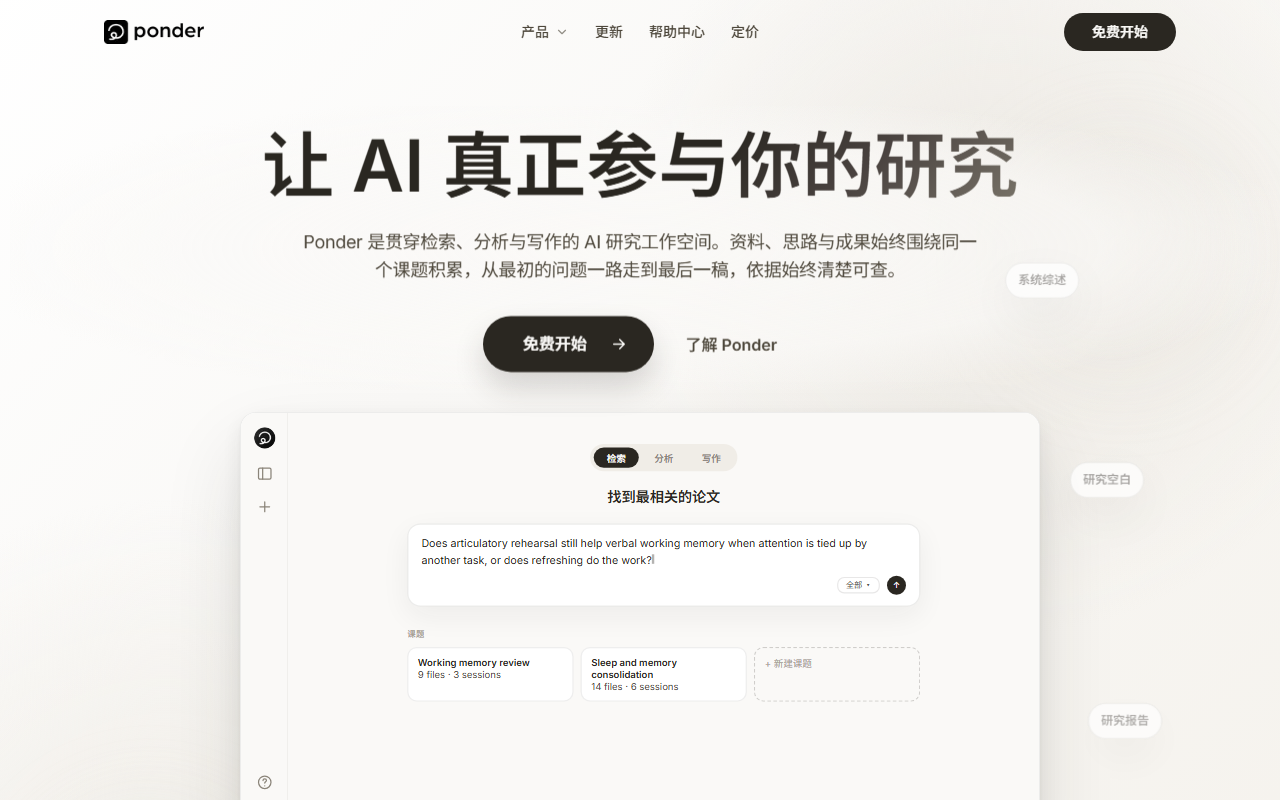
Ponder AI is an AI knowledge and mind mapping tool that organizes material in a tree: import PDFs, videos or web pages, ask questions, take notes and link nodes in one space, let Ponder Agent assist the analysis, then export a report, mind map or Markdown file.
What Is Ponder AI
Ponder AI is a knowledge management and mind mapping tool built for deep thinking. Instead of the linear documents most note apps rely on, it uses a tree-structured workspace: you import PDFs, videos, text and web pages into one space, then ask questions, take notes and build connections on nodes so ideas branch and converge the way they naturally do.

It sits somewhere between a note tool and a research assistant. On one side it handles the housekeeping of collecting material; on the other, the built-in Ponder Agent takes part in the thinking itself, flagging blind spots you may have missed, suggesting links between sources and helping you turn scattered thoughts into structured conclusions. Results can be exported as a report, a mind map or clean Markdown, turning thinking into something you can share and reuse.
Key Capabilities
Knowledge Integration and Expansion
Import PDFs, videos, text and web pages and keep everything in a single space. For research work this solves the scattering problem: once references, video explanations and web clippings live in one place, expanding a single idea into a wider web of connections becomes practical.
Multi-Dimensional Analysis
Analyze and compare across multiple sources to surface meaningful relationships between documents. Reading papers one by one and stitching them together from memory is slow; side-by-side comparison suits literature reviews and competitive research far better.
AI-Assisted Thinking (Ponder Agent)
The built-in Ponder Agent stays with you through the whole process: it helps find gaps in an argument, suggests possible connections and assists in structuring your insights. It offers hints and leads, not verdicts — the judgment still belongs to you.
Flexible Creative Space
Take notes on any node, edit freely and organize content visually; the workspace adapts to how you think. The advantage of a tree is that several threads can advance in parallel without forcing you to decide their order up front.
Output
Export your thinking as a structured report, a mind map or clean Markdown. Markdown is convenient for further editing, while reports and maps are better suited to presenting or sharing directly.
Support for Deep Thinking
The tree interface lets thoughts branch and merge like a river, escaping the limits of linear tools and supporting multi-threaded thinking without losing focus. This is the clearest difference from outliner-style tools.
How to Use
- Sign up: Go to https://ponder.ing/ , create an account and sign in.
- Import material: Bring in the PDFs, videos, text or web links you need and build your source space.
- Create and connect nodes: Organize ideas and sources as nodes, then link them into a tree.
- Use the AI assist: Call on Ponder Agent while thinking to flag blind spots, suggest connections and help structure conclusions.
- Edit and expand: Add notes on any node and adjust the structure as your thinking develops.
- Export results: Save the process and conclusions as a report, a mind map or a Markdown file.
Pricing
The plans recorded in our material are billed annually; the monthly equivalents are:
- Casual: about $8/month, 800 AI credits, unlimited upload/download, 150MB per-file upload limit, unlimited Ponders, AI scraping and saving of external resources, export to PNG and HTML.
- Plus: about $24/month, 2,500 Pro AI credits plus unlimited basic AI use; other limits match Casual.
- Pro: about $48/month, 6,000 Pro AI credits plus unlimited basic AI use; other limits match Casual.
Prices and credit rules may change, and the material does not mention a free tier or trial, so check the official pricing page before subscribing.
Use Cases
- Academic research: Consolidate large volumes of papers, reports and research material, and use AI-assisted analysis to spot relationships between data, speeding up literature work and deepening topic understanding.
- Business analysis: Bring together market data, customer feedback and competitor information, then compare across dimensions and recognize patterns to produce insights that support decisions.
- Education: Students and teachers organize course material, understand and memorize complex concepts visually, and explore links between topics with AI.
- Project management: Plan project workflows, track progress and consolidate input from different team members.
- Creative writing: Writers and content creators organize ideas, develop storylines and integrate research material.
Limitations and Notes
- Pricing, credit amounts and upload limits come from verified product material and may change with versions and policy; always confirm on the official pricing page before subscribing.
- The per-file upload limit is 150MB, so larger audio, video or scanned files need compressing or splitting first.
- Ponder Agent provides hints and suggestions that may be inaccurate or incomplete; verify factual conclusions against the original sources.
- Imported PDFs, videos and web content may be subject to copyright or terms of use, so confirm licensing before sharing exported results publicly.
- Mind maps and reports export to PNG and HTML; other formats, such as editable mind map project files, may need additional conversion.
- Centralizing research material, notes and ideas in the cloud means account security and data location matter; for sensitive or unpublished material, review the privacy and data handling terms first.
FAQ
How is Ponder AI different from a regular note or outliner tool?
Regular note tools organize content as linear documents or fixed outlines. Ponder AI uses a tree structure that lets ideas branch and merge in parallel, keeps PDFs, videos and web pages in one space, and brings Ponder Agent into the analysis — a better fit for research and deep thinking.
What kinds of material can it import?
The material confirms PDFs, videos, text and web pages, plus AI scraping and saving of external resources. Once imported you can ask questions, take notes and build links in the same space; the per-file upload limit is 150MB.
What formats can I export my thinking to?
You can export a structured report, a mind map and clean Markdown. Paid plans also mention PNG and HTML export; available options depend on the current version.
Is there a free version?
The material provides no information about a free tier or trial, listing only the Casual, Plus and Pro annual plans. Check the official pricing page or your account after signing up to confirm.
Can I quote the AI's analysis directly?
We advise against it. Ponder Agent's role is to flag blind spots, suggest connections and help structure thinking; its output can be off. Verify everything against the original sources before using it in papers, reports or business decisions.


Frequently asked questions
How is Ponder AI different from a regular note or outliner tool?
Regular note tools organize content as linear documents or fixed outlines. Ponder AI uses a tree structure that lets ideas branch and merge in parallel, keeps PDFs, videos and web pages in one space, and brings Ponder Agent into the analysis, a better fit for research and deep thinking.
What kinds of material can it import?
The material confirms PDFs, videos, text and web pages, plus AI scraping and saving of external resources. Once imported you can ask questions, take notes and build links in the same space; the per-file upload limit is 150MB.
What formats can I export my thinking to?
You can export a structured report, a mind map and clean Markdown. Paid plans also mention PNG and HTML export; available options depend on the current version.
Is there a free version?
The material provides no information about a free tier or trial, listing only the Casual, Plus and Pro annual plans. Check the official pricing page or your account after signing up to confirm.
Can I quote the AI's analysis directly?
We advise against it. Ponder Agent's role is to flag blind spots, suggest connections and help structure thinking, and its output can be off. Verify everything against the original sources before using it in papers, reports or business decisions.



