

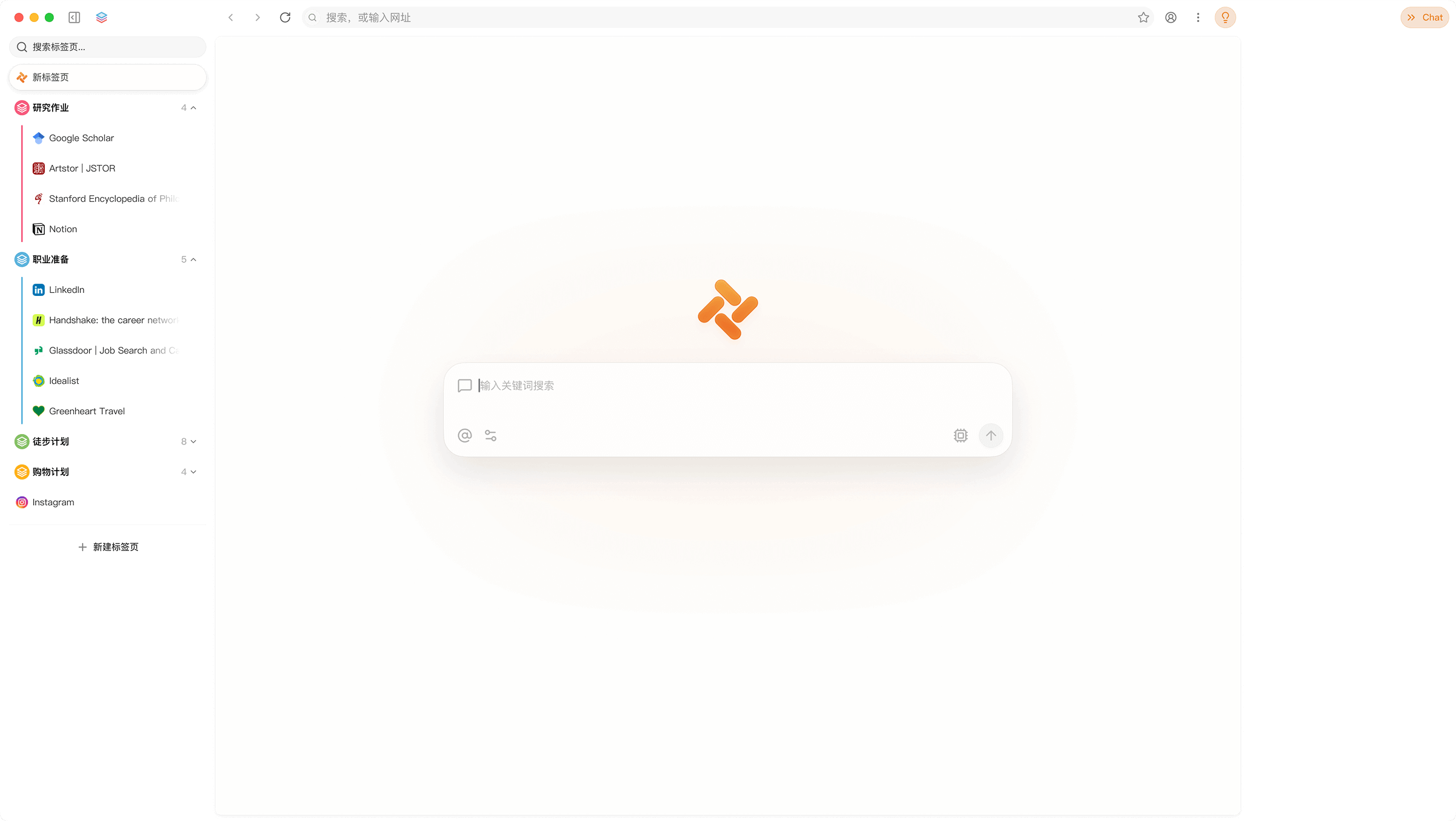
Tabbit merges the browser and the task-running agent into one entry point. A universal input box below the address bar handles search, chat and shortcuts; for complex work you switch to agent mode and it opens pages, scrapes details, fills forms and moves data between systems inside its own tab group, then notifies you. It also adds a vertical tab bar with automatic grouping, one-click migration from Chrome, Safari or Edge, and a script feature that customises pages from natural-language descriptions. Requirements are macOS 12 or later on Apple silicon, or Windows 10 or later. Free use is described as a public-beta policy; pricing, per-task time limits, concurrency caps and model quotas are not published, and any action that submits payments, approvals or public posts should keep a human confirmation step.
Tabbit: an AI-native browser that hands web chores to an agent
Much of the working day gets shredded inside a browser: copying order numbers between three backends, re-titling the same article for five platforms, opening a dozen pages to find the numbers for a weekly report. None of it is hard, but none of it automates easily because every system has its own interface. The usual answer is extensions, scripts and exported spreadsheets, and the chain breaks as soon as it gets long. Tabbit tries a different route by making the browser itself the execution environment: the task goes to an agent, the agent works in its own tab group, and you keep reading your page. Whether that saves time depends on the agent's success rate against real backends and on how quickly a person notices when it goes wrong.
According to the vendor, Tabbit was launched by Meituan's Guangnian Zhiwai team as an AI-native browser rather than an extension layer, positioned as an intelligent work partner. It puts three things in one interface: ordinary browsing, conversation with a model, and complex web operations executed by an agent. Agent tasks run in a separate tab group, so daily browsing is not disturbed, and a notification arrives when the run ends. That isolation is more dependable than chatting and operating the same page at once, because the run cannot click away from what you are reading.
The model layer is aggregated: DeepSeek-V3.2, Kimi-K2.5, Qwen3.5-Plus, GLM-5 and Doubao-Seed-1.8 are built in and can be switched freely, free during the public beta. The practical gain is matching the model to the job, since structured extraction, long-document reading and script generation reward different strengths. Note that free access is a beta policy; formal pricing and quotas are not disclosed, so heavy users should watch for changes.
What it actually does
Agent mode
Automates complex web work: cross-system data transfer, form filling, ticket handling, research and data aggregation. Tasks run in their own tab group with live progress and a notification at the end. The value appears on long chains, where you state the goal once instead of copying and pasting dozens of times. The risk sits on the same chains: if a page is redesigned or a session expires mid-run, someone still has to check the output.
Model switching
Models can be swapped next to the input box. Running the same material through two of them often exposes blind spots that a single model hides; the cost is that you must judge which answer is trustworthy rather than assuming the longest one wins.
Skills and scripts
A skill saves a frequent prompt or workflow as a shortcut invoked with a slash, with official examples such as status reports, topic planning and paper reading. A script is the page-side counterpart: describe what you want in natural language and it generates a rule for cleaning ads out of a page, batch-extracting assets or restyling an interface, which can be saved and reused.
Tabs, input box and migration
A vertical tab bar replaces top tabs, groups pages by theme automatically and supports separate workspaces. One input box covers search, chat, skills and scripts. On first launch you can import bookmarks, passwords and history from Chrome, Safari or Edge, which is what makes a switch realistic rather than theoretical.
Getting started
- Download the build for your system from the official site: macOS 12 or later on Apple silicon, or Windows 10 or later.
- On first launch, import bookmarks, passwords and history from Chrome, Safari or Edge, or start clean.
- Type into the universal input box below the address bar to get used to search and chat sharing one entry.
- Compare two models on the same material to find the combination that suits your tasks.
- Open the skill list with a slash, try a preset template, then save your own prompts and format rules.
- For a complex job, switch to agent mode, state the goal, scope and delivery format once, watch progress in the tab group and verify the result.
Who it suits
- Operations and finance staff who enter records, reconcile numbers and submit approvals across several SaaS backends every day.
- Content distributors who must re-title and reformat one article for several platforms.
- Analysts who run competitor and market research on a schedule and can hand the search and structuring to an agent.
Prerequisites and limits
- Free access is described only as a public-beta policy; formal pricing, per-model quotas, task duration limits and concurrency caps are not published.
- The agent depends on the target site's login state and page structure, so captchas, second-factor prompts or redesigns can interrupt a run, and submitting actions such as payment, approval or publishing should keep human confirmation.
- Scripts generated from natural language can misread complex requests, so batch extraction and page rewrites need spot checks.
- Requirements are strict: macOS 12 or later on Apple silicon, or Windows 10 or later, which rules out older machines.
Frequently asked
How is this different from an AI extension on Chrome?
An extension layers features onto an existing browser and inherits its page and permission limits. Tabbit builds the agent, tab management and scripting into the browser, so tasks can run in a separate tab group without interrupting what you are reading.
Do the built-in models cost extra?
The vendor says switching between models is free during the public beta, but no formal pricing or quota has been published.
Will the agent pay or submit on my behalf?
It can fill and submit forms, but actions involving money, approvals or public publishing should keep a human confirmation step because they are hard to undo.
What is the difference between a skill and a script?
A skill stores prompts and workflows, answering how to ask. A script generates rules that act on the page, answering what to clean or extract. They combine well.

Frequently asked questions
How is this different from an AI extension on Chrome?
An extension layers features onto an existing browser and inherits its page and permission limits. Tabbit builds the agent, tab management and scripting into the browser, so tasks can run in a separate tab group without interrupting what you are reading.
Do the built-in models cost extra?
The vendor says switching between models is free during the public beta, but no formal pricing or quota has been published.
Will the agent pay or submit on my behalf?
It can fill and submit forms, but actions involving money, approvals or public publishing should keep a human confirmation step because they are hard to undo.
What is the difference between a skill and a script?
A skill stores prompts and workflows, answering how to ask. A script generates rules that act on the page, answering what to clean or extract. They combine well.



