

图改改 (PhoText) is an AI-based online image text editing tool. After an image is uploaded, the system automatically detects text areas, allowing users to click and replace text, as well as adjust font, color, size, and positioning. Its AI intelligently matches the original font style and repairs backgrounds seamlessly—leaving no ghosting or color blocks even across complex textures like wood grain, fabric, and lighting shadows. It also supports conversational AI editing, text/watermark removal, image translation, and high-precision OCR directly in the browser without requiring Photoshop.
Quick Answer
图改改 is an AI-powered online image text editor (released in English as PhoText) that lets you click on text inside an image to edit it directly, requiring zero professional design skills like Photoshop.
What Is 图改改 (Product Overview)
图改改 functions as an in-browser image text editor. Once a user uploads an image, the system automatically identifies text regions. Users can simply click to replace text and modify the font, color, size, and position. The integrated AI matches the original font style and seamlessly inpaints backgrounds, avoiding ghosting or patchy color blocks even on challenging textures such as wood grain, fabric, and complex lighting.
In addition, it supports conversational AI editing—allowing edits through a single natural language prompt—as well as text and watermark removal, image translation, and high-precision OCR for individuals and teams needing to quickly modify screenshots, posters, and e-commerce assets.
Key Features
1. AI Text Editing
Automatically recognizes text regions via OCR after uploading. Click any text to modify the copy, font, color, size, alignment, and letter spacing.
2. Conversational AI Editing
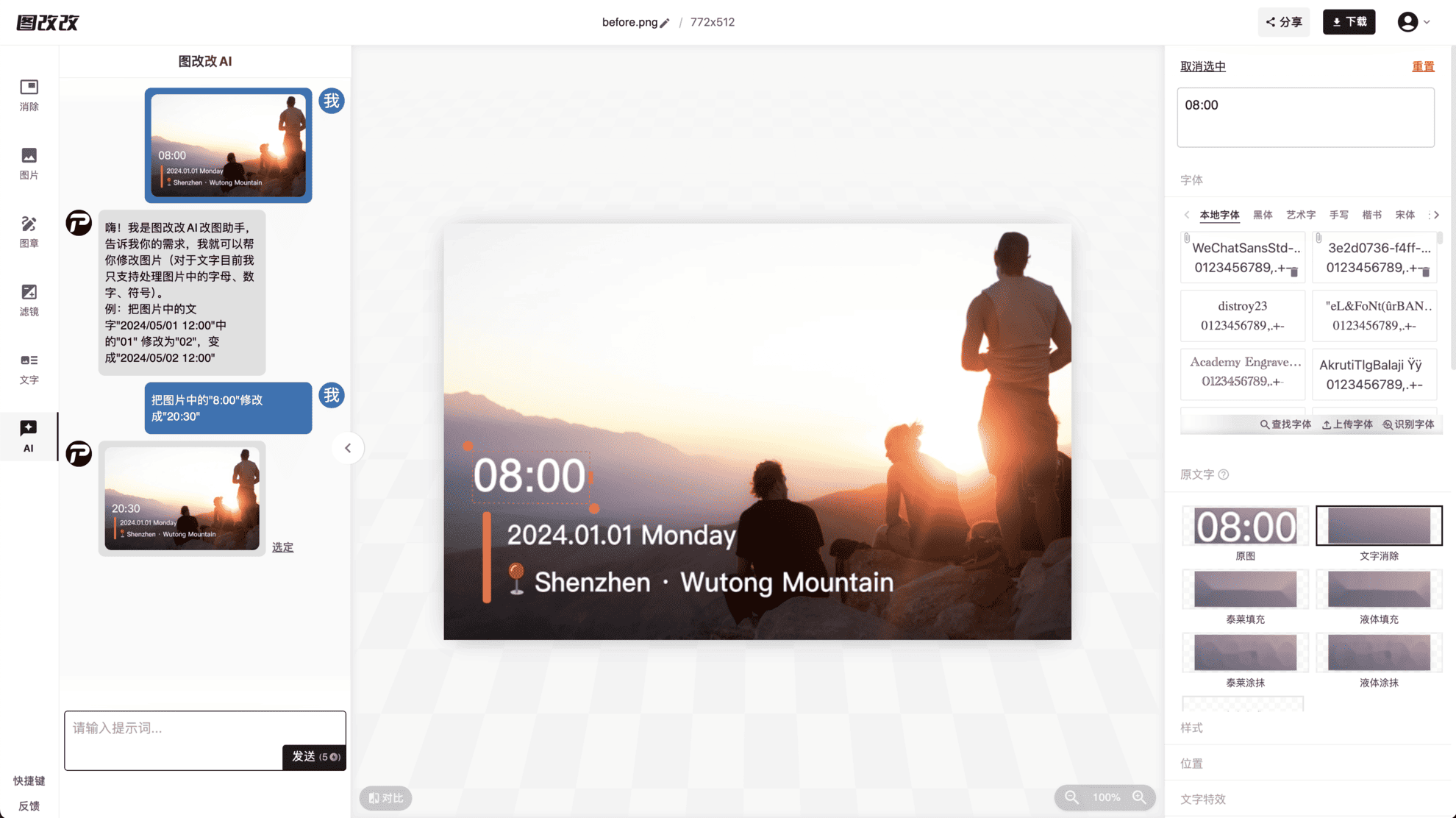
Perform surgical local modifications using natural language prompts (e.g., "change 8:00 to 20:30"). The tool alters only the text area, leaving all surrounding pixels intact.
3. AI Font Matching
The "Identify Font" feature detects fonts in the image and pairs them with visually similar options. It includes a rich font library and supports font search and custom font uploads.
4. Text and Watermark Removal
Intelligently reconstructs background textures using AI, removing unwanted text or watermarks with virtually no residual artifacts.
5. Image Text Translation
Detects text in the image and translates it into multiple languages while preserving the original layout, font style, and visual design.
6. High-Precision OCR
Supports comprehensive multilingual recognition capable of handling skewed, curved, small, mixed, or complex background text.
7. Auxiliary Editing Tools
Equipped with an eraser pen, stamp stickers, filter effects (grayscale, blur, pixelate, etc.), and artistic typography.
8. Multi-Format Support
Compatible with JPG, PNG, JPEG, WEBP, BMP, and PDF formats, with high-resolution export support for image dimensions up to 2560×2560.
How to Use 图改改
- Visit the Website: Go to the official 图改改 site at https://tugaigai.com/ or the English version at https://photext.ai/ without downloading or installing any software.
- Upload an Image: Drag and drop or click to upload your target file (supports JPG, PNG, JPEG, WEBP, PDF).
- Edit the Text (Two Methods):
- Manual Mode: Click the text inside the image you want to change, enter the new copy, and adjust font (click "Identify Font" for automatic matching), color, size, and position in the right panel.
- AI Mode: Type a natural prompt into the PhoText AI chat box on the left (e.g., "change '01' to '02'"), and the AI will handle identification, erasing, replacement, and style replication automatically.
- Review Results: Use the "Compare" feature to evaluate before-and-after results. If spots or blemishes appear, toggle alternative background repair schemes.
- Download and Save: Click the top "Download" button to export your high-definition image or share it directly.
Practical Use Cases
- Office Document Correction: Update dates, quotation figures, or table errors in screenshots while maintaining the exact original layout.
- Certificates and Contracts: Correct names, dates, or titles on certificates while keeping font size and typography consistent.
- Social Media Content: Edit dialogue bubbles in chat screenshots, meme captions, or promotional banners.
- E-Commerce and Marketing: Update product copy, promotional pricing, and campaign dates to rapidly repurpose visual assets.
- Content Localization: Translate image text into foreign languages for cross-border e-commerce and international campaigns.
- Watermark Removal: Strip away watermarks, timestamps, and extraneous text to recover a clean base image.
Advantages
- Zero Learning Curve: No Photoshop skills required; complete edits in three steps within the browser via a true WYSIWYG workflow, skipping tedious masking, manual alignment, and font searching.
- Full AI Automation: Integrates semantic understanding, smart background repair, and style transfer—conversational editing requires no manual selections or parameter tuning.
- Seamless Background Repair: Reconstructs complex surfaces like wood grains, textiles, and varied lighting without leaving white borders or artifacts.
- High-Fidelity Style Reproduction: Accurately mimics original font properties, color, stroke weight, perspective, drop shadows, and gloss.
- Cost-Effective: Free access to core basic features and generous free trial quotas for advanced features, with transparent pricing.
- Privacy and Data Security: Does not collect user photos, device data, or location info; images from guest users are auto-deleted after 3 days, and after 30 days for registered accounts.
Limitations and Notes
- Maximum supported image size is 2560×2560; larger images must be compressed before uploading.
- In manual mode, background erasing may occasionally produce minor blemishes, requiring users to switch inpainting schemes or switch to conversational AI mode.
- 图改改 specializes in editing and translating text inside images; it is not a full-fledged graphic design suite, so complex illustrations or layouts still require dedicated software.
- Pricing tiers and trial quotas are subject to change; always verify on the official website.
Pricing Verification
According to documented records, 图改改 offers free basic features and complimentary trial quotas for advanced capabilities, but specific tier pricing and detailed subscription costs are not specified in available materials. As pricing policies are variable, please visit the official site at https://tugaigai.com/ or the English site at https://photext.ai/ to confirm current terms.
Alternative Solutions
Reference materials note comparable alternatives: AI-powered online image and video editing platforms designed for e-commerce and creative workflows, supporting JPG, PNG, JPEG, WEBP, and PDF formats. If your workflow centers on video editing or bulk e-commerce operations, exploring those multi-purpose platforms is sensible; however, if your primary need is direct image text replacement, watermark removal, or image translation, 图改改 provides a much more direct, click-to-edit workflow.
Frequently Asked Questions (FAQ)
How do I match the edited font with the original image font?
Select the text and click "Identify Font" in the font panel. The AI will detect and match similar typography. You can also search via Find Font or upload your own custom font file.
What should I do if spots appear after erasing the background?
The background removal module provides multiple inpainting schemes to choose from. Alternatively, use conversational AI editing, which typically avoids spotting artifacts.
How can I modify only one specific text section when an image has a lot of text?
In manual mode, click precisely on the target text to edit it, or manually erase that area and insert new text. The fastest method is using conversational AI editing to execute the local change via a single prompt.
What image formats and resolutions are supported?
图改改 supports JPG, PNG, JPEG, WEBP, BMP, and PDF files, up to a maximum resolution of 2560×2560.
Sources
- 图改改 on
- 图改改 Official Site: https://tugaigai.com/
- PhoText (English Version): https://photext.ai/
Format support, free trial quotas, and privacy rules may change with ongoing product updates; please refer to the official platform for the latest details.
Frequently asked questions
What is 图改改? Does it require software installation?
图改改 is an AI-powered online image text editor (available in English as PhoText). It runs entirely in your web browser at https://tugaigai.com/ or https://photext.ai/ with no installation or Photoshop skills required.
How can I ensure the new font matches the original image?
Click the target text and select "Identify Font" in the font customization panel. The AI will recognize the existing font and match identical or similar fonts from its library. You can also search or upload custom font files.
What should I do if spots appear after background removal?
The background removal tool includes multiple repair schemes you can switch between. Alternatively, submit a natural language prompt via conversational AI mode, which generally prevents spotting.
How do I edit just one text element when an image contains multiple text sections?
In manual mode, click precisely on the specific text element you want to change, or erase that specific spot and type new text. You can also prompt the AI chat box to execute a pinpointed local change.
Which image formats and dimensions does 图改改 support?
It supports JPG, PNG, JPEG, WEBP, BMP, and PDF formats, accommodating image resolutions up to 2560×2560 with high-resolution export.
Is 图改改 free? How does it protect user privacy?
Basic features are free, and advanced tools provide trial quotas. Regarding privacy, 图改改 does not collect photos, device data, or location information; uploaded files are automatically deleted after 3 days for guest users and after 30 days for registered accounts.



