

Tusi is an AI-native app creation platform from Tencent. It turns ideas described in natural language into installable native Android apps, and also provides editing and polishing tools plus APK export.
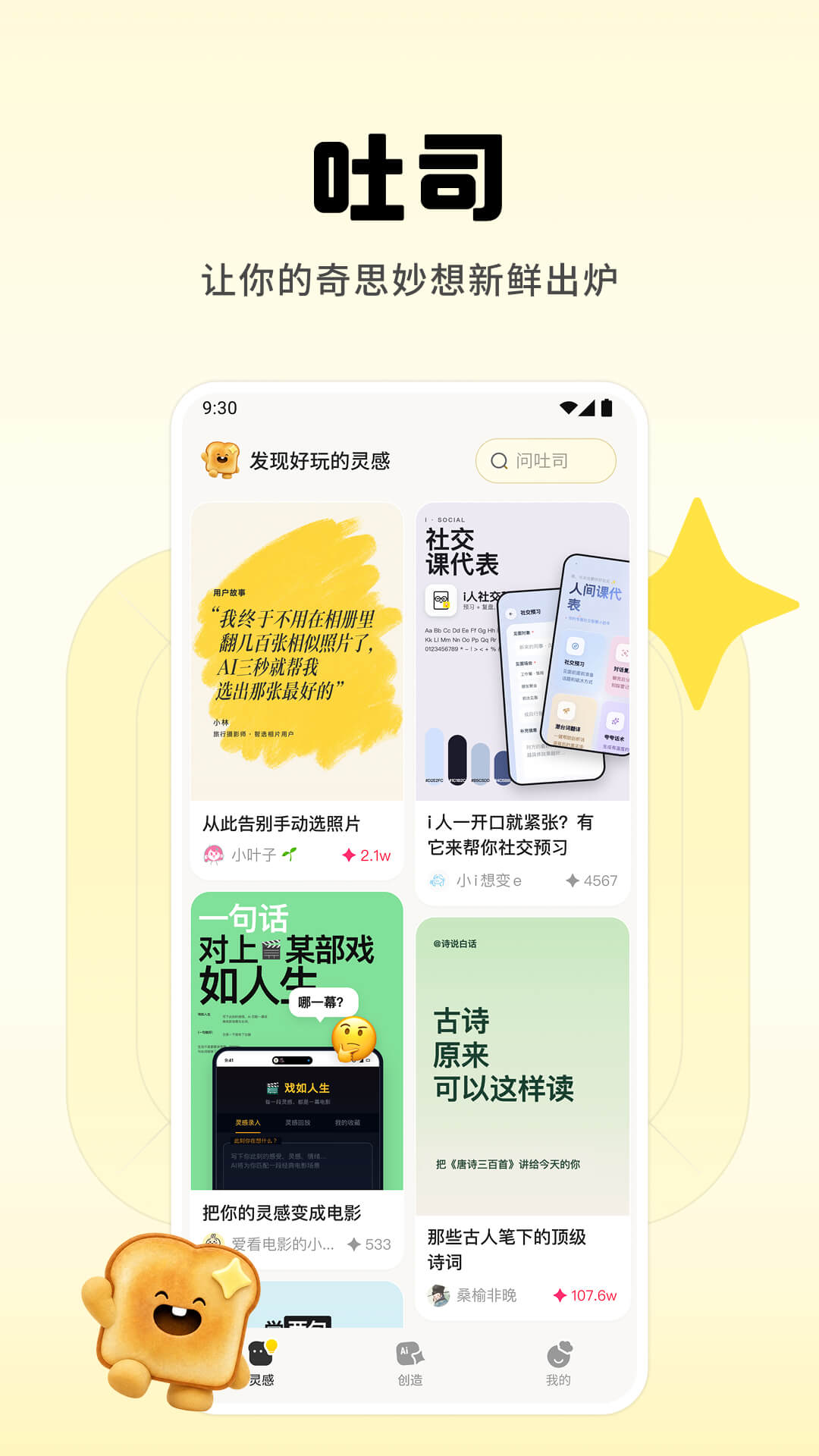
Tusi: The AI-Native Platform That Turns an Idea Into an Android App
Platform Overview
Tusi is an AI-native app creation platform from Tencent. You describe what you want to build in plain natural language, and the AI works out the underlying functional logic and generates a complete native Android app. No code is written at any point, and no programming background is required — even someone starting from zero can turn a still-vague idea into an app that can actually be installed, opened, and used.
What sets Tusi apart from conventional low-code tools is that the requirements step is handed to the AI: you describe what you want, not how to assemble it. After generation, the platform still leaves room for human input, so details can be adjusted and refined repeatedly. That makes it suitable both for quickly producing a working prototype and for polishing a small tool you intend to use every day.
Main Capabilities
AI-generated apps: Describe an idea in natural language and the AI maps out the functional logic and generates a complete native Android app — no coding required.
Intelligent requirement mapping: A one-sentence idea is broken down into a reasonably clear functional structure, which helps surface the parts you had not thought through and reduces rework caused by vague requirements.
Fine-grained editing and polishing: The generated app can be adjusted and optimized down to the details, including changes to functionality and presentation, to match individual preferences.
One-tap APK export: Once generation is complete, an APK package can be exported directly for installation and testing on a local device, or shared with others through social channels.
Inspiration Plaza: A built-in collection of curated app templates and creative cases spanning social assistants, photo selection, study tools, and more, so you can start from an existing example and find your direction.
Collaborative creation: Existing templates can be remixed and built upon, letting you adapt someone else's starting point into your own version and further lower the barrier to app development.
Broad scenario coverage: Documented use cases include exam question banks, fortune and horoscope tools, Mandarin proficiency tests, pet health logs, dream journals, ingredient freshness checks, and perpetual calendars.
How to Use It
Describe the idea: Write down, in natural language, the app you want — roughly what problem it solves and who it is for.
Let the AI map the logic: The platform breaks your description into the functional modules and flows the app should have, producing a structure it can generate from.
Generate the app: The AI produces a complete native Android app based on that structure.
Edit and polish: Refine the result in detail, iterating until it matches what you had in mind.
Export the APK: Export the installation package with a single action once you are satisfied.
Install and share: Install it on an Android device, test it in real use, or pass it along to other people.
Who It Is For
Personal productivity and study tools: Narrow but frequently used utilities such as exam question banks or Mandarin practice tests, built for yourself.
Life-logging apps: Things like pet health logs, dream journals, or ingredient freshness tracking, used to record personal data or states over time.
Hobbies and long-tail needs: Perpetual calendars, horoscope tools, and similar niche requests that rarely have a perfect match in an app store — generating your own often fits better.
Prototype validation: Before committing to real development, turn the idea into something that actually runs, to check whether the flow holds up and the experience feels right.
A first build for non-developers: People with no coding background who still want to turn an idea into working software.
Limitations and Notes
Android-focused: The output is a native Android app exported as an APK. Publicly available material does not mention an iOS version.
You install and test it yourself: The exported APK has to be installed on your own device. When installing packages from outside an app store, follow the relevant rules of your device system and app marketplace.
AI output still needs human review: Functional logic, interface presentation, and generated content should all be tried out and verified, especially in sensitive areas involving personal information, health, or finance.
Some information is not public: Pricing, app store listing and distribution, team collaboration, and data export capabilities are not covered in the available material — check the platform's latest in-product documentation before relying on them.
Frequently asked questions
What is Tusi and what is it used for?
Tusi is an AI-native app creation platform from Tencent that converts ideas described in natural language into installable native Android apps. It suits relatively single-purpose personal tools such as study question banks, life logging, horoscope tools, and perpetual calendars, as well as validating an idea prototype before formal development.
Do I need programming skills to use Tusi?
No. You only describe your idea in natural language and the AI maps out the functional logic and generates a complete native Android app; no code is written. Afterwards you can still edit and polish the details.
What kinds of apps can Tusi generate?
The platform covers a broad range of scenarios. Documented examples include exam question banks, fortune and horoscope tools, Mandarin proficiency tests, pet health logs, dream journals, ingredient freshness checks, and perpetual calendars. The built-in Inspiration Plaza also offers curated templates such as social assistants, photo selection, and study tools, which can be remixed and built upon collaboratively.
What are the limitations of apps built with Tusi?
Output is a native Android app exported as an APK, and no iOS version is mentioned in publicly available material. You need to install and test the exported APK on your own device. AI-generated logic and content should still be reviewed by a human, particularly in sensitive contexts involving personal information, health, or finance. Pricing, app store distribution, team collaboration, and data export are not documented in the available material.



