

Viggle AI is an AI character video app with motion imitation, character replacement and lip-sync features.
Viggle AI APP: add movement and video effects to character images
Viggle AI is an AI app for creative video and animated characters. The available description says users can upload a person or character image and try making it follow movements and expressions, or place it into a video scene. It also describes character replacement, lip-sync and community creation. Check the current version for available features, device support and results.
Ways to create
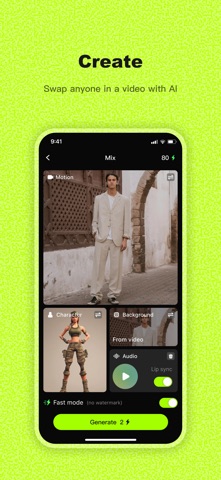
The described Live feature lets an uploaded character image follow a user’s movements and expressions. Mix places a character image into a video, while Multi is intended for scenes with several characters. Mic and Rap can combine text, recordings or music to try speech, singing and movement effects. Input requirements, templates and processing times may differ by mode, and results can contain inaccurate lip movements or distorted limbs.
Community content can provide inspiration. Whether remixing or derivative creation is allowed depends on the specific work’s permissions and platform rules. Do not assume that adapting another person’s work, music or video includes publication or commercial rights.
Getting started
- Choose an available live character, replacement or lip-sync feature and read its input requirements.
- Upload images, video or audio you have permission to use and select a movement or template as directed.
- Review character identity, movement, expression and audio synchronization; adjust or recreate if necessary.
- Before saving, streaming or sharing, check material permissions, visibility and export limits in the app.
Obtain clear consent before using another person’s photo, voice or likeness; obtain guardian permission for images of children. Synthetic content may be mistaken for real footage, so respect the wishes of people depicted and disclose AI generation or synthesis when appropriate. Read privacy and data-handling terms before uploading, and avoid sensitive materials when their use is unclear.
Frequently asked questions
Can Viggle AI animate a still character?
The description mentions motion-following characters and replacement in videos. Availability and results depend on the current version.
Can I freely use a friend’s or public figure’s photo?
Do not assume so. Obtain necessary likeness and material permissions and follow platform rules.
Are lip-sync and motion effects always accurate?
No. Lip movements, actions or visuals can contain errors, so inspect them before publishing.
Frequently asked questions
Can Viggle AI animate a still character?
The description mentions motion-following and replacement; availability varies by version.
Can I freely use a photo of another person?
Obtain necessary likeness and material permissions and follow platform rules.
Are lip-sync and motion effects always accurate?
No. Check lip movement, action and visuals before publishing.



