

WetuTalk is a free education app built around one loop: speak inside a simulated situation, get a pronunciation correction mid-conversation, then say the sentence again. Public information lists iOS 13.0 or later, with support for iPhone, iPod touch, Mac and Apple Vision devices.
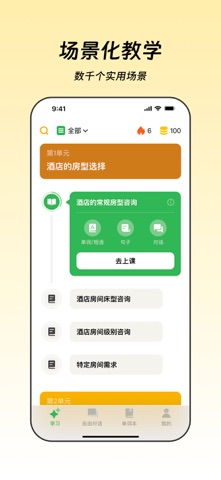
WetuTalk: a free AI app for practising spoken language through scenario dialogue
WetuTalk is a free education app for practising spoken language, and it puts the conversation first rather than the curriculum. You say something, the AI answers, and mistakes in pronunciation are corrected while the exchange is still running. For learners who can read and write a language but freeze when they have to speak it, that low-pressure, repeatable format is easier to keep up than booking a human partner.
Many language products build a course structure first and bolt AI on afterwards. WetuTalk works the other way round: the entry point is the dialogue itself. Practice is organised by situation, and the learner moves back and forth with the AI inside a defined context, so full sentences get used in realistic roles instead of being rehearsed as isolated vocabulary.
Public information describes an Apple-focused release: iOS 13.0 or later, running on iPhone, iPod touch, Mac and Apple Vision. The same practice routine therefore carries across a phone, a desktop and a spatial headset, which matters for consistency, because a habit built on one device tends to survive when the second device offers the identical flow.
The app is categorised as free education software aimed at independent learners rather than at training departments that need scheduling, assessment and reporting. That shapes the product: no classes, no homework queue, and a pace the user sets.
What the app actually does
AI scenario dialogue
The app simulates a real situation and has the learner hold a conversation inside it with an AI partner. The situation is more than a topic prompt: it supplies the context that tells you what the other side just said, why a reply is expected, and which register sounds natural. Working through that exchange forces the learner to produce complete utterances instead of reciting word lists, which is the step most self-study routines skip.
Instant pronunciation feedback
During the dialogue, pronunciation errors are flagged and corrected as they happen. This timing is the point. A mispronounced sound repeated for weeks becomes much harder to fix than one caught on the first attempt, because the wrong version has already been stored as the default. Correcting on the spot means the learner simply repeats the sentence and moves on, and that repeated small success is what gradually removes the fear of speaking.
How the two combine
Taken together, the two capabilities form a short loop: enter a scenario, speak, receive a correction, repeat. The shorter that loop, the more attempts fit into a practice session, and for spoken language the number of attempts is the main driver of progress. That is also why the app opens on a conversation rather than on a course catalogue.
How to use it
- Check the device: iOS 13.0 or later, on iPhone, iPod touch, Mac or Apple Vision.
- Pick a scenario close to your actual goal, such as greetings, ordering, asking directions or workplace small talk, and start with the situation you are most likely to face.
- Answer in full sentences rather than single words. Grammar can be imperfect; getting the meaning across matters first.
- Watch for a correction during the exchange and repeat that sentence once, confirming the fix before continuing the conversation.
- Run the same scenario two or three more times until you can reply without pausing to plan, then move to the next situation.
Who it fits
- Learners who read and write reasonably well but avoid speaking, and who need a practice environment without social pressure.
- People preparing for a trip, an interview or everyday communication who want to rehearse the shape of a specific conversation first.
- Apple device owners who want the same practice flow on phone and Mac.
Limits and things to check
- The source does not state how many scenarios exist, which languages are covered, or whether practice is graded by level; confirm inside the app.
- No subscription, in-app purchase or usage cap is disclosed. The listing only describes the app as free education software.
- Feedback is described as corrections during the dialogue. The source does not mention phoneme-level scoring, a pronunciation report or practice history.
- Only Apple hardware is covered in the public description; no Android build or other platform is mentioned.
- No official site, privacy policy or explanation of how voice recordings are handled is provided, so check the in-app disclosure before using it with personal audio.
Frequently asked questions
Is WetuTalk free?
It is listed as free education software, but the source does not say whether in-app purchases, subscriptions or usage limits exist. Confirm inside the app.
Which devices are supported?
Public information lists iOS 13.0 or later, covering iPhone, iPod touch, Mac and Apple Vision. No Android version is mentioned.
How does the pronunciation correction work?
Errors are corrected during the AI dialogue so the learner can repeat the sentence accurately. The source does not describe the scoring model behind it.
Is it suitable for complete beginners?
The feature set centres on speaking inside scenarios and fixing pronunciation, which suits learners who already have some base. The source makes no claim about absolute beginners.
Frequently asked questions
Is WetuTalk free?
It is listed as free education software, but the source does not say whether in-app purchases, subscriptions or usage limits exist. Confirm inside the app.
Which devices are supported?
Public information lists iOS 13.0 or later, covering iPhone, iPod touch, Mac and Apple Vision. No Android version is mentioned.
How does the pronunciation correction work?
Errors are corrected during the AI dialogue so the learner can repeat the sentence accurately. The source does not describe the scoring model behind it.
Is it suitable for complete beginners?
The feature set centres on speaking inside scenarios and fixing pronunciation, which suits learners who already have some base. The source makes no claim about absolute beginners.



