

Wisfile uses AI to recognize file content and help rename or organize files in batches.
Wisfile: AI file renaming and organization
Wisfile uses AI to recognize file content and help rename or organize files in batches.
Features
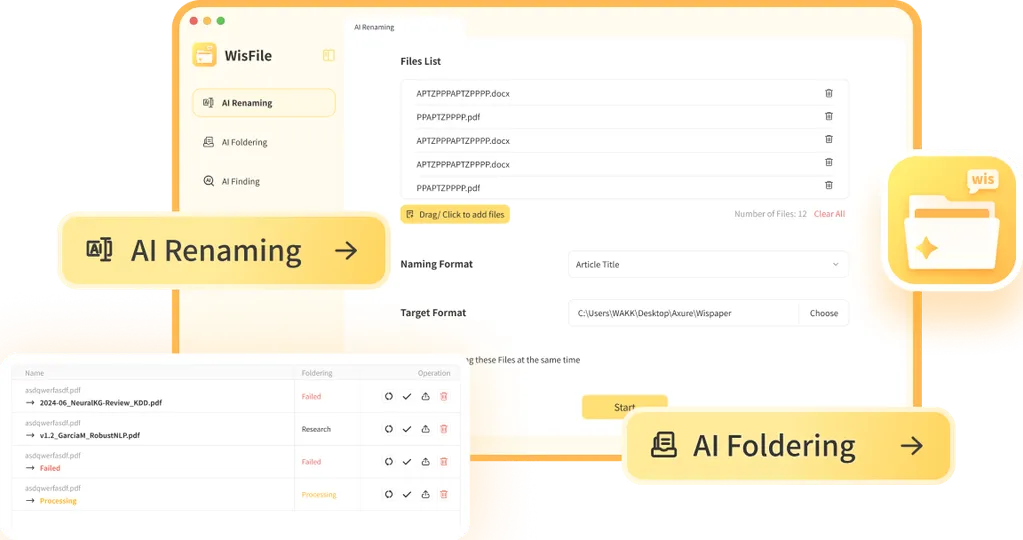
Product information describes extracting information from Word, PDF and other files, applying templates or custom naming rules, and batch classification. Supported formats depend on the current version; review suggested names to preserve their meaning.
How to use it
Get the appropriate version from the official site, select files or folders, choose the recognition mode and naming rules, review the preview and then run the batch. Back up important files, start with a small sample and check names, locations and references afterwards.
Data and considerations
The privacy policy distinguishes local and online models: content processed locally stays on the device, while online models may send content to servers. Check your selected mode, current policy and organizational rules. Features, system requirements and prices may change.
Frequently asked questions
Does it support batch renaming?
Product information describes batch processing and custom naming rules; check the current version.
Are files guaranteed never to be uploaded?
No. Local and online models handle data differently; check the mode and privacy policy.
What should I do before organizing files?
Back up important files, preview a small sample and check changes to names and paths.
Frequently asked questions
Does it support batch renaming?
Product information describes batch processing and custom naming rules; check the current version.
Are files guaranteed never to be uploaded?
No. Local and online models handle data differently; check the mode and privacy policy.
What should I do before organizing files?
Back up important files, preview a small sample and check changes to names and paths.



