

Xinglan AI suits anyone who needs a presentable professional photo without booking a studio: upload a sharp frontal shot, blend your face into an occupation or style template, and get a finished image in minutes, including HD ID photos in multiple sizes and background colours.
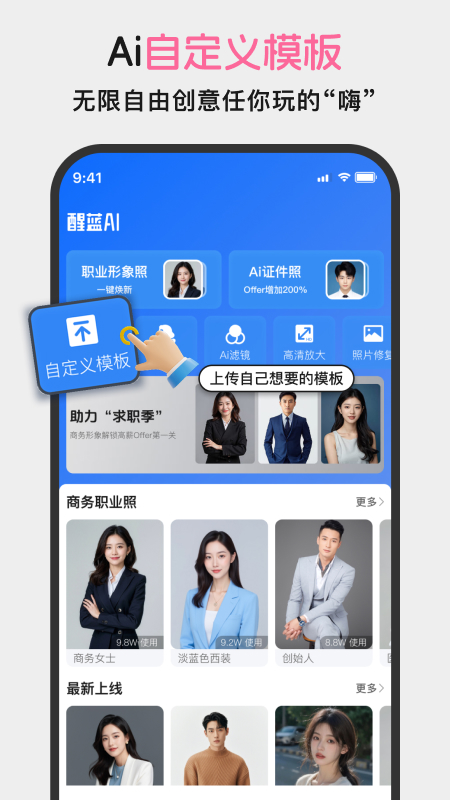
Xinglan AI: professional headshots, ID photos and portrait sets from one phone photo
Xinglan AI is a portrait photo generator that moves the studio visit onto a phone. You upload one clear frontal photo, pick an occupation or style template, and receive a usable professional headshot, ID photo or stylised portrait set. It covers more than 100 occupations and over 1,000 headshot templates, and adds smart cutout, photo restoration and HD upscaling alongside.
The core mechanic is template plus face blend: the template supplies clothing, background, lighting and framing, while face blending fits your features into it. The benefit is stable output, since you are not writing prompts or rerolling until something works. The trade-off is that the stylistic ceiling comes from the template library, so the more distinctive the look you want, the more you depend on template quality.
Several needs sit behind one entry point: headshots for job hunting and professional profiles, ID photos for exams and official paperwork, and stylised portraits for social media. The difference is mostly format and rules. ID photos are constrained by size and background colour, headshots live on bearing and lighting, portraits open the style right up. Smart cutout, detail restoration and upscaling all address the same underlying issue: the source photo is not good enough.
Key features
Professional headshots across occupations
Templates cover more than 100 occupations, from standard business suits, teaching and healthcare to narrower industry roles. After you choose one, face blending handles the wardrobe and background swap, and the framing, lighting and proportions already follow headshot conventions, so there is no manual cropping or alignment.
Custom template blending
Beyond ready-made templates, you can define a template and blend a face into it, adjusting the look to your role and taste. In practice people start from a close template and then nudge the wardrobe and background direction, which avoids a result that looks good but does not match the job.
ID photos in several sizes and backgrounds
Common formats from one inch to four inches are supported, along with blue, white and red backgrounds. That combination covers most exam registration and document requirements. Individual exams and issuing offices still publish their own pixel dimensions, head proportion and background specifications, so check each requirement after generating.
Smart cutout and watermark-free HD output
Cutout separates the person from the original background and underpins every background swap; its quality decides whether the edges look clean, and hair strands and pale clothing are where it usually struggles. Electronic ID photos come out at high resolution without a watermark, ready for online submission.
Stylised portrait sets
Portrait templates span fresh and sweet, fashion, Korean-style, bridal, business suit, street and retro Chinese-inspired directions. The wide range means different sides of the same person can be expressed, but output quality varies between templates, so pick a set that shares one lighting logic to keep a group coherent.
Detail restoration and HD upscaling
Restoration rebuilds detail so skin, hair and fabric read closer to a real photograph instead of an obviously synthetic surface. Upscaling enlarges a low-resolution source while keeping detail, which matters for printing or large layouts. Both are remedies for a weak original, not substitutes for a usable input photo.
How to use Xinglan AI
- Prepare a frontal photo with even lighting, a clear face and nothing covering it; a relaxed half-body shot works best.
- Open the app and pick the direction by purpose: professional headshot, ID photo or stylised portrait, each with its own templates and rules.
- Filter the library by occupation, style or setting and choose a template whose clothing and background fit the purpose.
- Upload the photo and run the face blend, then wait for the result; if the features sit awkwardly, try a sharper frontal source instead of regenerating repeatedly.
- For ID photos choose the size and background colour, then verify head proportion and background against the requirement.
- Use smart cutout when edges look rough, and restoration or upscaling when detail is soft.
- Export the watermark-free HD file and save it in the format and file size the submission channel asks for.
Who it suits
- Job seekers and interview candidates who need a formal headshot that does not look stiff.
- People preparing for exams, qualification reviews or document applications who need several sizes and background colours quickly.
- Freelancers and creators who want one coherent set of portrait assets for profiles, social platforms and business cards.
- Small teams and shops that need matching professional photos for staff without booking a studio.
Limitations to know
- The source does not disclose pricing, free quota or payment model, nor any limit on the number of generations, so confirm inside the app before relying on it.
- Supported platforms, whether an account is required and how uploaded faces are stored are not stated either; when faces are uploaded, read the privacy terms yourself.
- Face similarity depends heavily on the input: profile angles, harsh light, occlusion or low resolution all push the result away from the person, and a better source photo usually beats repeated retries.
- Compliance of an ID photo cannot be guaranteed by the tool; exams and issuing offices set their own pixel, background and head-ratio rules, so verify each item before submitting.
- AI portraits carry a risk of being judged as non-authentic in serious contexts such as job screening, visas or identity verification, and should not replace material that must be genuine.
Frequently asked questions
Will the generated headshot look like me?
Similarity depends mainly on the input photo. Frontal, evenly lit shots with an unobstructed face blend best; profile, backlit or low-resolution sources tend to drift from the person.
Which ID photo sizes and backgrounds are available?
Formats from one inch to four inches, with blue, white and red backgrounds, which covers most exam and document requirements.
Is the output watermarked?
Electronic ID photos are delivered at high resolution without a watermark and can be submitted online, though you should still match the recipient's size and format rules.
Can a generated photo be used for official documents?
It depends on the issuing office. Some contexts require a recent real photograph, and AI portraits may be rejected, so confirm the requirement first.
Frequently asked questions
Will the generated headshot look like me?
Similarity depends mainly on the input photo. Frontal, evenly lit shots with an unobstructed face blend best; profile, backlit or low-resolution sources tend to drift from the person.
Which ID photo sizes and backgrounds are available?
Formats from one inch to four inches, with blue, white and red backgrounds, which covers most exam and document requirements.
Is the output watermarked?
Electronic ID photos are delivered at high resolution without a watermark and can be submitted online, though you should still match the recipient's size and format rules.
Can a generated photo be used for official documents?
It depends on the issuing office. Some contexts require a recent real photograph, and AI portraits may be rejected, so confirm the requirement first.



