
Xinguang is an AI-driven life journaling companion for capturing everyday notes and photos, with automatic event classification, mood detection and trend analysis, suited to anyone who wants a long-term record, emotional awareness and regular review.
Xinguang: An AI-Powered Companion for Everyday Journaling
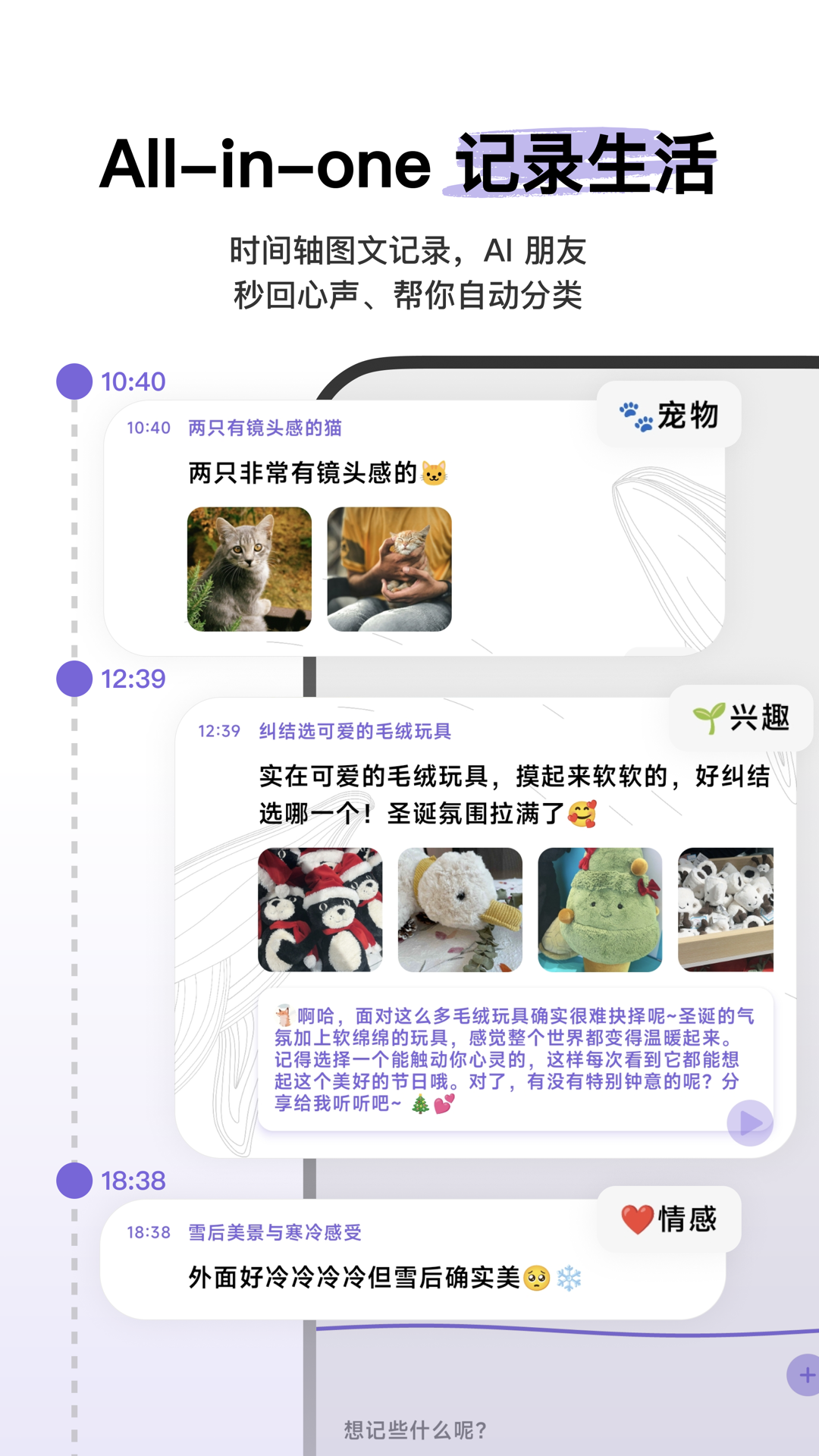
Xinguang is an AI-driven life journaling app built around one simple idea: write it down first, let the app sort it out later. Scattered notes, photos and passing thoughts are collected onto a single timeline, then automatically categorised, distilled and analysed by AI. Journaling stops being a discipline you have to maintain and becomes something you simply do. The app syncs across iPhone, iPad and Mac, so you can capture a thought on the commute and pick it up again at your desk.
Main Capabilities
Timeline Recording
Every entry is stamped automatically with a time and a geographic location. If you later realise the time was wrong, you can edit it or backfill a missed entry, and the timeline re-sorts itself. This "capture now, tidy later" flow removes most of the friction from keeping a journal.
Entry-Style Input
Write whatever comes to mind without deciding on a title, a category or a layout first. Contextual details such as weather and location are attached automatically, saving you the trouble of filling them in later and making each entry far more evocative when you reread it.
Xinguang Gallery
Photos and text live together in a gallery-style record, in high resolution and with no quantity limit. Each image is presented in a polaroid-like frame, so browsing feels like leafing through a photo album rather than scrolling a list of files.
Smart Event Classification
AI reads what you wrote and files each entry under work, food, study, exercise and similar categories, with no manual tagging. The longer you use it, the more closely the categories match your own habits.
Mood Traffic Light
The app infers your emotional state from your words and shows it with an intuitive red-amber-green indicator, so you never have to label your mood by hand. Over time you can look back at the shape of your emotional ups and downs.
Xinguang Crystal Ball
A dedicated AI companion you can talk to. Share the small stuff, talk through a decision, or look for comfort on a difficult day. Because it knows your past entries, its replies land closer to home than a generic chatbot.
Insights
Cumulative day counts, total word counts, frequently used words and mood trends give you a longer view of yourself.
How to Use
- Install the app on your devices, sign in with the same account and enable sync so your journal never breaks when you switch.
- Open the app and type whatever is on your mind, or add a photo straight away. No structure required.
- Let AI handle the rest: event classification, mood detection and location tagging all happen automatically.
- When you want to tidy up, review entries by event, mood, frequent words or map coordinates.
- When you feel like talking, open the Crystal Ball and chat with your personal AI.
- Check the Insights page regularly to watch long-term trends take shape.
Who It Suits
- Everyday jotting: fragmented thoughts on the train, in a queue or before bed, captured in seconds.
- Travel and days out: photos and locations saved together, so a complete timeline is ready when you get home.
- Emotional awareness: the mood indicator and trend charts help you notice your own cycles.
- Work and study review: smart classification keeps work and study entries apart, making reviews far more efficient.
- Long-term reflection: cumulative days and word-frequency stats reveal what you actually cared about over a period.
Limitations and Notes
- The publicly available material does not state a clear pricing or subscription plan; check the app for current charges.
- Available features, AI interaction limits and storage policies may change as versions update.
- Mood detection and event classification are algorithmic inferences, offered for reference only. They are not a psychological diagnosis or a basis for professional decisions.
- Automatic location capture requires system permission; related features will be limited if you turn it off.
- For anything sensitive, review the app's privacy and sync behaviour before you upload it.
FAQ
How is Xinguang different from an ordinary diary app? It is not just a container for text. It classifies entries, detects mood and runs statistics automatically, turning scattered notes into a thread you can reread, and it includes an AI chat companion that already knows your history.
Will I lose entries offline or when switching devices? The app syncs across iPhone, iPad and Mac. Sign in with the same account to continue your journal, though it is wise to confirm content is saved on the original device before the sync completes.
Do I have to tag entries manually? No. Smart event classification files entries under work, food, study, exercise and more automatically, and the Mood Traffic Light recognises how you felt without input from you.
What is the Xinguang Crystal Ball? It is the built-in personal AI you can chat with about your day, ask for advice, or lean on for comfort. Because it knows your past entries, its responses fit your situation better.
What data does Insights give me? Cumulative journaling days, total words written, plus word-frequency analysis and mood trends, helping you see your focus and emotional shifts over a longer stretch of time.
Frequently asked questions
How is Xinguang different from an ordinary diary app?
It is not just a container for text. It classifies entries, detects mood and runs statistics automatically, turning scattered notes into a thread you can reread, and it includes an AI chat companion that already knows your history.
Will I lose entries offline or when switching devices?
The app syncs across iPhone, iPad and Mac. Sign in with the same account to continue your journal, though it is wise to confirm content is saved on the original device before the sync completes.
Do I have to tag entries manually?
No. Smart event classification files entries under work, food, study, exercise and more automatically, and the Mood Traffic Light recognises how you felt without input from you.
What is the Xinguang Crystal Ball?
It is the built-in personal AI you can chat with about your day, ask for advice, or lean on for comfort. Because it knows your past entries, its responses fit your situation better.
What data does Insights give me?
Cumulative journaling days, total words written, plus word-frequency analysis and mood trends, helping you see your focus and emotional shifts over a longer stretch of time.



