

360 Security Lobster helps users deploy OpenClaw agents and connect them to office workflows through model selection, skills, plugins and messaging integrations. Verify current capabilities and security boundaries.
What is 360 Security Lobster?
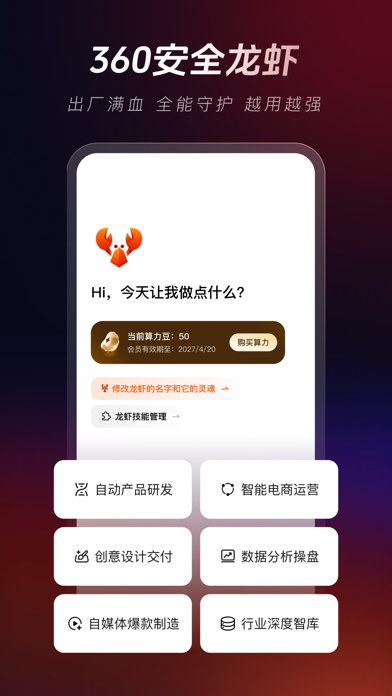
360 Security Lobster is an agent application built on OpenClaw. It is intended to help users deploy agents and connect them to common office workflows. The product description mentions access to multiple models, preconfigured office skills, OpenClaw plugin compatibility and connections to messaging tools such as Feishu, DingTalk and WeChat. It is a configurable agent environment rather than a single chat model. Supported versions, models, skills and integrations may change, so check the current product documentation.
Main capabilities
- Agent deployment: The product describes a one-click setup path intended to reduce environment configuration. Actual setup time depends on the device, network, accounts and runtime environment.
- Model selection: Users can choose from connected models for text, coding or multimodal tasks. Capabilities, costs, data handling and quotas vary by model; check each provider's terms.
- Office skills and plugins: Preconfigured skills or OpenClaw plugins can help with documents, content drafting and automated steps. Feature counts in product materials reflect its stated offering; confirm what is available in the current workspace.
- Messaging workflows: Depending on current support, connect Feishu, DingTalk or WeChat so workflows can be triggered from familiar communication tools. Determine what the bot can read and send before enabling it.
- Security measures: The product description cites sandbox isolation and prompt protection. These measures alone do not establish that every workflow or third-party plugin is safe; review permissions, data retention and external calls.
Getting started
- Check the current version, supported operating systems and deployment requirements.
- Select the model and skills for the task, and review the terms, costs and data handling practices of the relevant model and plugins.
- Configure a limited workflow in a test space. Grant only the file, network and messaging permissions needed for that task.
- Test with non-sensitive examples and inspect which files the agent accessed, which external tools it called and what it produced.
- Only then consider connecting real workspaces or business information. Recheck permissions and plugin sources regularly, and require human confirmation for consequential actions.
Use cases and precautions
Individuals and teams that want to combine models, skills and messaging tools into workflows may consider 360 Security Lobster as an OpenClaw deployment option. It may assist with document handling, drafting or repetitive office steps, but it cannot guarantee accurate outputs or successful completion in one attempt. Messages and attachments sent through an IM integration may be processed by models or plugins; check each integration's data flow and retention practices. Plugins may be able to read or write files, access the network or operate external services. Do not connect unreviewed plugins to sensitive environments or share credentials and confidential data with components that do not need them. Restrict automation for sending, deletion, payment, publication or business-record changes, and keep a human review step.
Frequently asked questions
What is 360 Security Lobster?
It is an OpenClaw-based agent app whose product description mentions model access, office skills, plugin compatibility and messaging integrations.
Can it automate every office task?
That is not guaranteed. Results depend on the model, skills, plugins, account permissions and task setup, so review important outputs.
What should I check before connecting messaging tools or plugins?
Review each integration's permissions, data flows, plugin source and execution scope. Test in a low-risk environment and grant only the access required.



