

April suits users who want to handle scheduling, mail-related operations, and several consecutive small tasks by voice on iPhone or iPad, reducing app switching and manual tapping.
April: An iOS Voice Assistant for Mail and Schedule Tasks
April is a smart voice assistant app whose core idea is to gather the entry points of everyday tools into voice commands. It can connect to Gmail and Google Calendar and other common tools, letting you finish tasks by speaking instead of switching between apps, searching for features, and tapping through menus. Scheduling and rescheduling is its most direct use case; in addition, you can update preferences and account information so that later interactions better match your personal habits. It is an app for iPhone and iPad, designed for iOS 16.0 and later.
Key Features
Smart Voice Assistant Connects to Gmail and Google Calendar and other common tools, completing tasks through voice commands. Compared with manual operation, the voice path removes the steps of opening the app, locating the feature, and filling in content.
Efficient Schedule Management Helps you arrange and adjust schedules quickly. Schedule changes are among the most frequent and most tedious operations; handing them to voice commands compresses the time cost of this kind of work.
Convenient Information Updates You can easily update preferences and account information. Preference settings directly affect how the assistant understands and executes commands, so keeping information current is a prerequisite for a stable experience.
Multi-Task Handling Supports fast handling of multiple kinds of tasks. Its value lies in the low switching cost between consecutive actions, which suits scenarios where several small operations are mixed into one work flow.
Steps to Use
- Confirm your system and device: the app requires iOS 16.0 or later and supports iPhone and iPad, so check that your device and system version meet the requirements before you start.
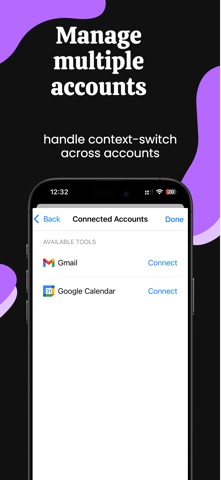
- Connect your everyday tools: authorize connections to services such as Gmail and Google Calendar. The scope of authorization determines which operations the assistant can perform on your behalf.
- Set preferences and account information: fill in your frequently used preferences first, because this step directly affects the accuracy of later commands.
- Give commands by voice: describe in natural language what you want done, such as adjusting a schedule, rather than tapping through menus item by item.
- Check the results: voice recognition may introduce errors, so for operations involving specific times, people, and content, confirm the outcome to avoid mistakes taking effect.
- Adjust preferences as needed: after using it for a while, update preferences based on your actual habits so later behavior stays closer to expectations.
Suitable Scenarios
- Arranging or adjusting schedules, especially when plans change at short notice
- Mail-related operations where you want one voice command instead of repeated taps
- Use while moving, when it is not convenient to operate the screen for long
- Handling several small tasks in a row and wanting to reduce app switching
- Users who want to gradually hand everyday operations over to a voice assistant
Limitations and Notes
- Voice recognition can be imprecise; commands involving times, names, and specific content should be confirmed before execution.
- The range of capabilities depends on the tools you have authorized; services that are not connected cannot be operated by voice.
- iOS 16.0 or later is required, and device models are limited to iPhone and iPad.
- The assistant replaces operation steps, not judgment; important mail and schedule changes are best confirmed by a person before they take effect.
- Preferences and account information involve personal data, so pay attention to the authorization scope when updating them.
Frequently asked questions
What can April do?
April connects to Gmail and Google Calendar and other common tools, completing tasks through voice commands. This includes quickly arranging and adjusting schedules, updating preferences and account information, and handling multiple consecutive small tasks. Its core value is removing steps of switching between apps and tapping manually.
What are the requirements and limits of April?
April requires iOS 16.0 or later and supports iPhone and iPad. Its capabilities depend on the tools you have authorized, and services that are not connected cannot be operated by voice. Voice recognition may be imprecise, so confirm commands involving times, names, and specific content, and check important mail and schedule changes before they take effect.
Do I need to complete preferences before using voice commands?
Yes. Preference settings directly affect how the assistant understands and executes commands, so filling in your frequently used preferences first improves the accuracy of later instructions. You can also update them later based on your actual habits.



