

Grok is an AI assistant app from xAI covering DeepSearch retrieval, math, science and coding problem solving, free in-chat image generation and real-time information. Basic use is free, with SuperGrok available for higher limits; treat its output as reasoning and drafts rather than professional advice.
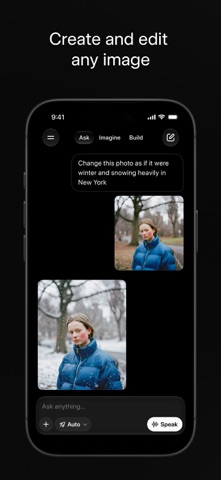
Grok: search, problem solving and image generation in one chat
Grok is an AI assistant app from xAI. It folds several jobs into a single place: when you need to research something, DeepSearch returns a detailed answer with its reasoning laid out; when you hit a tough math, science or coding problem, you can work it out in the same conversation; when you need a picture, you generate it right there. It also pulls in current information so answers do not stay frozen at an old date. The tone is dry and humorous rather than corporate.
What Grok is
At its core it is a general-purpose assistant that lives behind a chat box. You do not have to decide in advance which feature to use. Ask the question and it works out whether to search, calculate or draw.
What separates it from single-turn Q&A products is mostly two things: it goes deeper by combining web search with reasoning, and it puts image generation inside the conversation flow. That makes continuous tasks, where you look something up, think it through and then produce a visual, noticeably smoother.
Core capabilities
DeepSearch: retrieval with a visible reasoning trail
DeepSearch is built for questions that need digging. Instead of handing you a one-line summary, it runs searches, filters out weak sources, shows how it reached the conclusion, and then states the answer.
Typical uses: checking a contested claim, catching up on where a field stands, or comparing the trade-offs between several approaches. You see not only the answer but how it was assembled, which matters when you need to judge how far to trust it.
Problem solving: math, science and code
Grok handles mathematical derivation, scientific explanation and programming questions. While coding you can ask it to explain an error, refactor a block of logic, or compare two implementations.
One caveat: for complex problems, verify the result yourself. The model gives you a line of reasoning and a draft, not an authoritative answer.
Image generation: draw inside the chat
Describe the image you want and it generates one, with no extra charge on the basic tier. For illustrations, mood boards or turning an idea into something visible, staying in the same thread beats switching tools.
Generated images work well as drafts and concept sketches. If you plan to publish them, check the details against what you intended, and avoid using the feature for other people's likenesses or copyrighted material.
Real-time information: answers that keep up
With access to current data, Grok can answer time-sensitive questions about what just happened instead of relying only on training-time material. For tracking an industry or following a developing event, that matters more than raw model size.
Conversational style: less like filling in a form
Answers carry humour and read closer to a normal conversation. This is not only about tone. With learning and exploration, a lighter exchange makes you more willing to keep asking follow-up questions.
How to use it
- Open the app and sign in. On mobile it requires iOS 17 or later.
- Just ask in plain language. No commands to memorise, no mode to pick.
- When you need depth, ask explicitly for sources and reasoning. That is more likely to trigger the deeper search path.
- For images, describe the scene in the chat. The more specific the description, the closer the result.
- Double-check the output. Especially numbers, citations and code; cross-verify anything that matters.
Free and paid
Basic use is free, image generation included. For higher limits or stronger capabilities you can upgrade to a paid plan such as SuperGrok. Exact pricing and entitlements follow the in-app description, and availability varies by region.
Who it suits
- Developers and technical users: debugging, explaining code, weighing technical options.
- Students and self-learners: getting abstract concepts explained until they click.
- Content creators: quick illustration drafts and topic ideas.
- Anyone tracking information: replacing constant tab-switching with live retrieval.
Things to keep in mind
- An answer is not a conclusion. For medical, legal or financial judgements, treat model output as reference only.
- Privacy is your call. Before sharing sensitive details in a conversation, decide whether it is necessary.
- Image rights and compliance. Confirm licensing and local rules before using generated content commercially.
- Regional availability differs. Whether you can use it, and which features you get, depends on where you are.
FAQ
Who makes Grok? It is made by xAI.
Is it free? Basic chat and image generation are free; higher limits or advanced features require a paid subscription.
How is DeepSearch different from a normal question? A normal question returns an answer directly. DeepSearch retrieves, filters sources and shows its reasoning, which suits verification and deeper investigation.
Does it support Chinese? It supports many languages, and Chinese conversations work normally.
Can it replace professional advice? No. It is good at organising information and offering directions; professional judgement still needs a qualified person.
Frequently asked questions
Who makes Grok?
It is made by xAI and arrives as a general-purpose AI assistant app built around a chat box.
Is it free to use?
Basic chat and image generation are free; higher limits or advanced capabilities require a paid plan such as SuperGrok.
How is DeepSearch different from a normal question?
A normal question returns an answer directly. DeepSearch retrieves, filters sources and shows its reasoning, which suits verification and deeper investigation.
Can it replace professional advice?
No. It is good at organising information and offering directions; medical, legal and financial judgement still needs a qualified person.



