

Qianwen Input Method App (latest version) is an AI input method launched by Alibaba's Tongyi Qianwen team, based on the Tongyi Qianwen large model and CosyVoice voice capabilities. It supports dual-mode voice and keyboard input: voice mode converts spoken language into polished written text in real time, automatically removing filler words, correcting slips, and intelligently refining wording, while supporting 9 dialects including Cantonese and Sichuanese, as well as mixed Chinese-English input. Keyboard mode supports 26-key and 9-key switching, with smart suggestions, fuzzy pinyin, input error correction, and one-handed mode. The product has no ads, pop-ups, or news feed, and all core features work without registration.
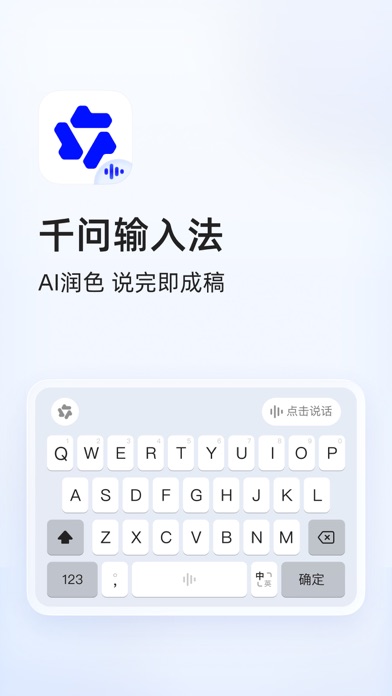
What is Qianwen Input Method App Latest Version
Qianwen Input Method App (latest version) is an AI input method launched by Alibaba's Tongyi Qianwen team, built on the Tongyi Qianwen large model and CosyVoice voice capabilities. It supports dual-mode input: voice and keyboard. Its core idea is to convert spoken language into polished written text in real time, automatically removing filler words, correcting slips, and intelligently refining wording, while supporting 9 dialects including Cantonese and Sichuanese, as well as mixed Chinese-English input.
Unlike traditional input methods that only handle typing, Qianwen Input Method brings the large model's understanding and rewriting capabilities into the input process, turning spoken words directly into usable text.
Product Positioning
- Developer: Alibaba Tongyi Qianwen team.
- Technology foundation: Tongyi Qianwen large model + CosyVoice voice capabilities.
- Product form: AI input method with dual-mode voice and keyboard input.
- Experience principle: Clean and ad-free, no login required; all core features are available without registration.
Core Features
AI Voice Input: Speak and Get Written Text
Based on the Qianwen voice large model, it supports fast speech, soft speech, dialect accents, mixed Chinese-English input, and weak network environments. During input, it automatically removes filler words, reorganizes word order, and applies paragraph formatting. It can also split content into lists, meeting notes, or memos, giving you structured text as soon as you finish speaking.
Multiple Ways to Speak
Supports short-press on the microphone or long-press on the space bar to speak. Swipe left to cancel and swipe right to send directly. The controls are flexible and comfortable for users with different habits.
9 Dialects: Understands You Right Away
Supports 9 dialects including Cantonese, Sichuanese, and Shanghainese. No manual switching is needed—what you say is what appears. It is also friendly for users whose Mandarin is not standard.
Voice Can Also Write Long Content
A single recording can be up to 3 minutes long. Long emails, weekly reports, meeting highlights, and similar content can be used directly after speaking, with no need to split them into multiple entries.
Smooth Keyboard: Typing Works Well Too
Supports switching between 26-key and 9-key layouts, with smart suggestions, fuzzy pinyin, input error correction, and one-handed mode. Even if you type quickly and make mistakes, it can still offer the correct candidates.
Clean and Ad-Free, No Login Required
No ads, no pop-ups, no news feed. All core features work without registration, giving you a clean and focused typing experience.
How to Use
- Install Qianwen Input Method App (latest version) on your device and enable it in system settings.
- Open any app where you need to enter text and switch to Qianwen Input Method.
- Voice input: Short-press the microphone icon to speak, or long-press the space bar. After speaking, swipe left to cancel or swipe right to send directly.
- Long-form input: A single recording can be up to 3 minutes, suitable for speaking emails, weekly reports, or meeting highlights in one go. The system automatically removes filler words, reorganizes word order, and formats paragraphs.
- Keyboard input: Switch between 26-key and 9-key layouts as needed, using smart suggestions, fuzzy pinyin, and error correction to type. Enable one-handed mode when needed.
- Dialects and mixed Chinese-English input require no manual switching; just speak and it will be recognized.
Use Cases
- Mobile work: Draft long emails and weekly reports by voice during your commute; the text is ready as soon as you finish speaking.
- Meeting notes: Dictate meeting highlights and have them automatically organized into a list or meeting minutes.
- Dialect users: Users accustomed to speaking Cantonese, Sichuanese, Shanghainese, and other dialects can input without switching modes.
- Situations where typing is inconvenient: Use voice to enter long text while walking, doing chores, or when your hands are not free.
- Users who want a clean experience: People who do not want ads, pop-ups, or news feeds in their input method.
Advantages
- Voice transcription is based on the Tongyi Qianwen large model and CosyVoice voice capabilities, and can automatically refine wording, correct errors, and format text.
- Supports 9 dialects and mixed Chinese-English input, with no manual switching required.
- A single recording can be up to 3 minutes, so long content can be spoken once and used directly.
- Complete keyboard mode: 26-key/9-key layouts, smart suggestions, fuzzy pinyin, error correction, and one-handed mode are all available.
- No ads, no pop-ups, no news feed; all core features are available without registration.
Limitations
- Voice transcription quality can be affected by the environment. Actual recognition in noisy environments should be verified based on your own experience.
- A single recording is limited to 3 minutes; content longer than that must be entered in segments.
- Dialect support is limited to the 9 officially listed dialects; recognition for dialects or accents outside this list cannot be guaranteed.
- Download channels and supported system versions are not fully specified in the public materials; please refer to official channels for details.
Pricing Verification Note
According to the public fact sheet, Qianwen Input Method is described as ad-free and all core features work without registration, but no specific pricing details, paid features, or subscription plans are provided. The feature scope and pricing strategy may change with versions. Before downloading or using it, please check official channels for the latest pricing and availability information.
Alternatives
If you want to compare options when choosing an input method, you can evaluate similar apps on the following dimensions: whether they support dialects and mixed Chinese-English input, whether voice transcription includes automatic refinement and formatting, the maximum duration of a single recording, the keyboard's suggestion and error-correction capabilities, and whether there are ads or mandatory login requirements. It is recommended to try apps one by one based on your common scenarios (office notes, dialect input, long-form dictation, etc.) before deciding.
Official Channel Information
The public fact sheet does not provide an official website URL or download link for Qianwen Input Method App (latest version). To keep your device safe, obtain the installation package through official app stores or Tongyi Qianwen's official channels, and rely on the features and pricing information published on official pages.
Frequently asked questions
Who developed Qianwen Input Method App latest version?
Qianwen Input Method was developed by Alibaba's Tongyi Qianwen team, based on the Tongyi Qianwen large model and CosyVoice voice capabilities. It supports dual-mode voice and keyboard input.
Which dialects does Qianwen Input Method support?
It supports 9 dialects including Cantonese, Sichuanese, and Shanghainese, with no manual switching needed. It also supports mixed Chinese-English input.
What is the maximum length of a single recording?
A single recording can be up to 3 minutes long. Long emails, weekly reports, and meeting highlights can be spoken in one go and used directly.
Do I need to register or log in to use Qianwen Input Method?
No. Qianwen Input Method has no ads, no pop-ups, and no news feed. All core features work without registration.
Is Qianwen Input Method free?
The public fact sheet does not provide specific pricing information. Check official channels for the latest pricing and availability details before downloading.
Where can I download Qianwen Input Method?
The public fact sheet does not provide an official website URL. Use official app stores or Tongyi Qianwen's official channels to obtain the installation package safely.



