

SuiShen XiaoJi is a mobile app combining AI voice notes and smart expense tracking, used to record spending, notes, and to-dos quickly and review them on a single timeline.
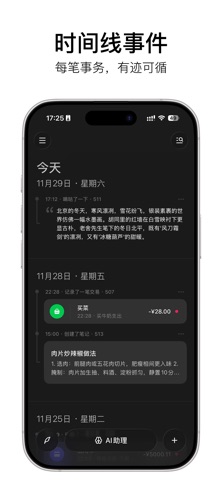
SuiShen XiaoJi: AI Voice Notes and Smart Expense Tracking App
SuiShen XiaoJi is a mobile app that combines AI voice notes with smart expense tracking. Its AI voice quick-capture lets you record spending, notes, and to-dos simply by speaking or typing. A distinctive timeline gathers income and expenses, notes, tasks, and anniversaries onto a single line for easy review. Users can hold open conversations with the AI assistant and customize its personality and capabilities, while managing money through AI bookkeeping, receipt photo capture, and screenshot import, supported by clear spending trends and category charts. The app also includes to-do lists, item management, and an idea notebook, with all data stored locally by default.
Key Features
- AI voice quick-capture: Hold to speak and record expenses, notes, and to-dos, for example "spent 30 on groceries today" or "meeting at 10 tomorrow", and the AI turns them into tidy entries. Text input is also recognized and categorized automatically.
- Distinctive timeline: Income and expenses, notes, to-dos, and anniversaries all appear on one timeline, so life events are easy to review and records for a specific date can be found quickly.
- AI bookkeeping: Record income and spending as if chatting, and the AI classifies entries and builds the ledger automatically.
- Receipt photo capture: Photograph a receipt and the AI reads the amount, date, and other key details into the ledger, cutting manual typing.
- Screenshot import: Capture a billing screenshot from a shopping or delivery platform and the app recognizes and imports the data automatically.
- Data insights: Clear income and spending trends plus category charts help users understand their finances.
- Smart planning: The AI assistant plans to-dos from what you enter and syncs them to the system calendar.
- GTD support: The Getting Things Done (GTD) method is supported to help organize tasks and raise efficiency.
- Item and idea management: Build an information base for collectibles or household stock with price, quantity, and shelf life, keep an idea notebook, and use the app as a second brain for studying and work.
- Local storage: All data is stored only on the user's phone by default and is not uploaded to third-party servers.
- Trustworthy AI service: It uses leading, secure AI services and does not store any private user data.
- iCloud backup: Upgrading to the premium version enables iCloud backup, balancing safety and convenience.
How to Use SuiShen XiaoJi
- Install the app from your app store and complete the basic setup in the guided flow.
- Choose how to record: hold the microphone and speak, or type directly; the AI recognizes and sorts the content into entries.
- Log an expense: write income or spending as if chatting and let the AI classify it, photograph a receipt, or import a billing screenshot from a shopping or delivery platform.
- Review the timeline: browse income, expenses, notes, to-dos, and anniversaries and jump to any date.
- Plan tasks: talk with the AI assistant to turn items into a to-do list synced to the system calendar.
- Check insights: view spending trends and category shares to understand your consumption structure.
- Manage items and ideas: create entries for collectibles or stock with price, quantity, and shelf life, and keep spontaneous ideas in the notebook.
- Back up: upgrade to the premium version and enable iCloud backup if you need data across devices.
Who It Is For
- People who want fast bookkeeping: Record with one sentence or one receipt photo, lowering the barrier to keeping accounts consistently.
- Users who value life logging: The timeline links spending, notes, and anniversaries, making review easy.
- Busy professionals: AI-planned to-dos sync to the system calendar and work with the GTD method.
- Privacy-conscious users: Data stays on the phone by default and is not uploaded to third-party servers.
Limitations
- Accuracy of voice, receipt, and screenshot recognition depends on accent, pronunciation, image clarity, and layout; important entries should be checked manually.
- AI classification and task planning are assistive features, so key financial data and schedules should be reviewed by the user.
- Data is local by default, so without backup, changing or losing the device may make recovery impossible.
- iCloud backup requires the premium version; exact features and pricing follow the current information inside the app.
Frequently Asked Questions
What is SuiShen XiaoJi for? It is an app combining AI voice notes and smart expense tracking, used to record spending, notes, and to-dos quickly and to review them on one timeline.
How can I record expenses? You can let the AI classify entries by chatting, photograph a receipt for automatic recognition, or import a billing screenshot from a shopping or delivery platform.
Where is my data stored? All data is stored only on the phone by default and is not uploaded to third-party servers; upgrading to the premium version enables iCloud backup for cross-device use.
Is AI recognition always accurate? Voice, receipt, and screenshot recognition is affected by accent, image clarity, and layout, and AI classification and planning are assistive, so important entries and schedules should be checked manually.
Frequently asked questions
What is SuiShen XiaoJi for?
It is an app combining AI voice notes and smart expense tracking, used to record spending, notes, and to-dos quickly and to review them on one timeline.
How can I record expenses?
You can let the AI classify entries by chatting, photograph a receipt for automatic recognition, or import a billing screenshot from a shopping or delivery platform.
Where is my data stored?
All data is stored only on the phone by default and is not uploaded to third-party servers; upgrading to the premium version enables iCloud backup for cross-device use.
Is AI recognition always accurate?
Voice, receipt, and screenshot recognition is affected by accent, image clarity, and layout, and AI classification and planning are assistive, so important entries and schedules should be checked manually.



